1.0Introduction
1.1Executive summary
Nearly 700,000 small businesses in Maryland navigate registration, tax, and employment filing requirements across State agencies, including the Maryland Department of Assessments and Taxation (SDAT), the Comptroller of Maryland, and the Maryland Department of Labor (DoL).
Businesses spend too much time figuring out which requirements apply, re-entering information the State already has, and tracking what’s due. These challenges go beyond forms and websites: State information, processes, and systems don’t consistently connect. As businesses increasingly turn to AI tools for guidance, it becomes even more important that State information is accurate, authoritative, and consistent.
Maryland has tried to address these longstanding challenges before, but past efforts, including Business Express and cross-agency working groups, did not achieve lasting coordination. Older systems and vendor contracts also make large-scale changes difficult. This report proposes practical improvements agencies can start now and build on over time.
The report includes three pilots that offer a practical starting point for improving services to businesses. It also identifies the foundations needed to make modernization possible and sustainable: shared ownership, reliable data sharing and record matching, authoritative information about requirements, and consistent identity and access standards.
Businesses could eventually get the same clear answers wherever they look, sign in once, provide information once, and see what’s due across agencies in one place. The goal is simple: less time navigating government and more time running a business.
1.2About this report
This report was prepared for MEDCO by Blue Tiger, a Maryland-based digital consultancy that partners with government agencies to build simple, reliable public services. From August to November 2026, we worked with MEDCO and participating State agencies to understand the current filing experience and identify ways to improve it.
For this report, we consider small businesses to be those with fewer than 500 employees, consistent with the U.S. Small Business Administration’s 2025 Maryland profile. We focused on small businesses because they often have fewer resources to navigate complex filing processes. However, our recommendations will make filing easier for businesses of all sizes.
Sections 2–4 describe our research and findings, followed by:
-
Recommendations (Section 5): Changes to improve the filing experience.
-
Pilots (Section 6): Focused projects to test and deliver selected recommendations.
-
Foundations (Section 7): Capabilities needed to sustain improvements in the long-run.
The report concludes with closing remarks (Section 8) and an appendix (Section 9).
Back to top2.0How we gathered insights
We reviewed documentation, met with small businesses and agencies, and examined the systems and forms businesses use to understand recurring filing challenges and their causes.
2.1Documentation review
We reviewed State websites, forms, and guides to see how they explain filing requirements and where they send businesses to file. This included:
-
Web ecosystem review: We cataloged the websites small businesses may need to use, including Maryland Business Express, Maryland Tax Connect, MyCOMConnect, Maryland OneStop, BEACON (Unemployment Insurance), and Judiciary licensing portal, along with each agency website. Our audit focused on identifying which websites exist and how they differ from one another in scope, ownership, and function.
-
Information architecture assessment and language review: We compared how filing information is organized and described across public-facing websites.
-
Forms inventory: We built an initial inventory of forms relevant to small businesses across the Comptroller, SDAT, and DoL, drawing on publicly available sources (Appendix A).
-
System demos and testing: We set up accounts to walk through Business Express, Tax Connect and OneStop, and reviewed public demos and user guides.
2.2Interviews with small businesses
We interviewed seven small businesses about their experiences registering, filing, and maintaining their businesses in Maryland. We selected businesses with 1–50 employees who have different structures and filing needs to explore how the experience varies. This included a winery director, a co-owner of multiple businesses, and a benefits broker for small businesses.
These interviews provide insight into how businesses navigate the system, and why particular problems occur. Unlike a survey, which aims for statistical representation across a large sample, these interviews aim for depth: understanding not just what businesses experience, but why, in enough detail to explain a pattern.
We created two representative user journey maps to visualize the steps, thoughts, and emotions a small business experiences at different points in the small business filing lifecycle.
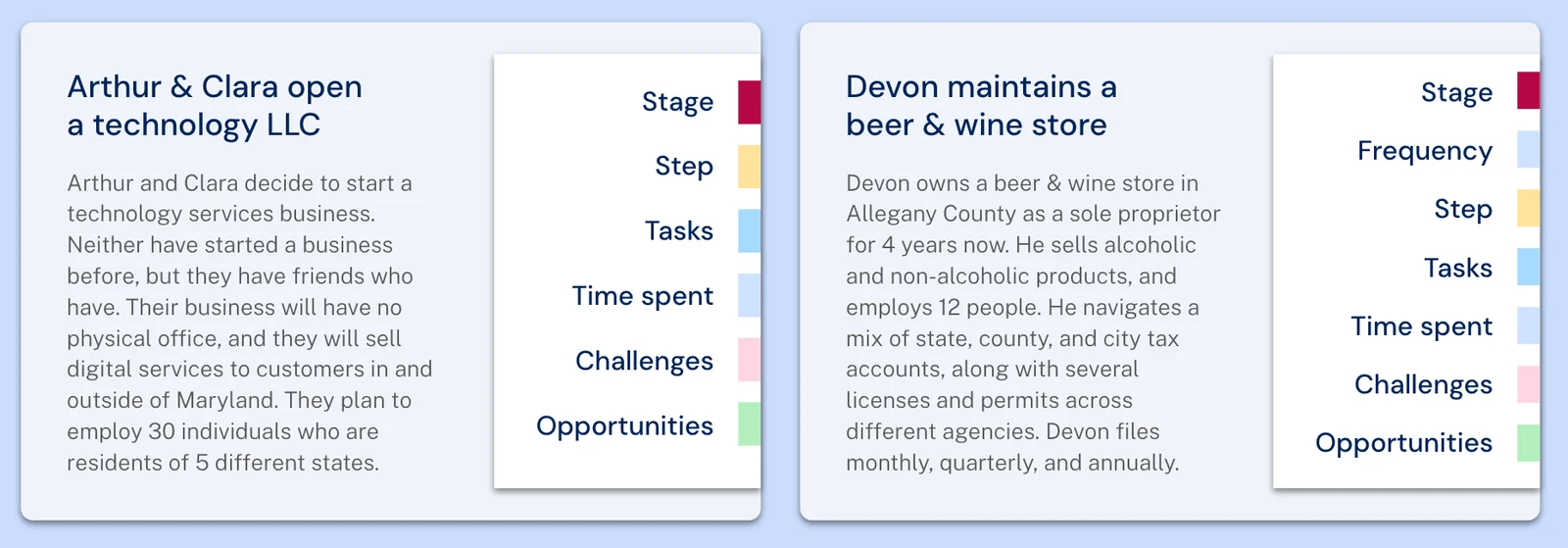
Image description
Arthur and Clara are starting a technology services business. Neither has started a business before, but they have friends who have. The business will have no physical office, will sell digital services to customers in and outside Maryland, and plans to employ 30 people who live in 5 different states. Devon has run a beer and wine store in Allegany County as a sole proprietor for 4 years. He sells alcoholic and non-alcoholic products, employs 12 people, manages a mix of state, county and city tax accounts along with several licenses and permits across different agencies, and files monthly, quarterly and annually. Each journey map is organized into rows for stage, step, tasks, time spent, challenges and opportunities; Devon’s also includes frequency.
2.3Agency workshops
We held several workshops with each participating State agency to understand its systems, information, and processes. Then, we brought agencies together for a cross-agency workshop, including staff from SDAT, Comptroller, Labor, Commerce, the Department of Information Technology (DoIT), and Maryland Benefits to discuss impact and feasibility of various ideas.
2.4Mapping the filing landscape
We created a service blueprint to map the filing experience across the stages of a business’s life, showing the steps businesses take, problems they encounter, and the forms, websites, support channels, agencies, policies, and systems behind them.
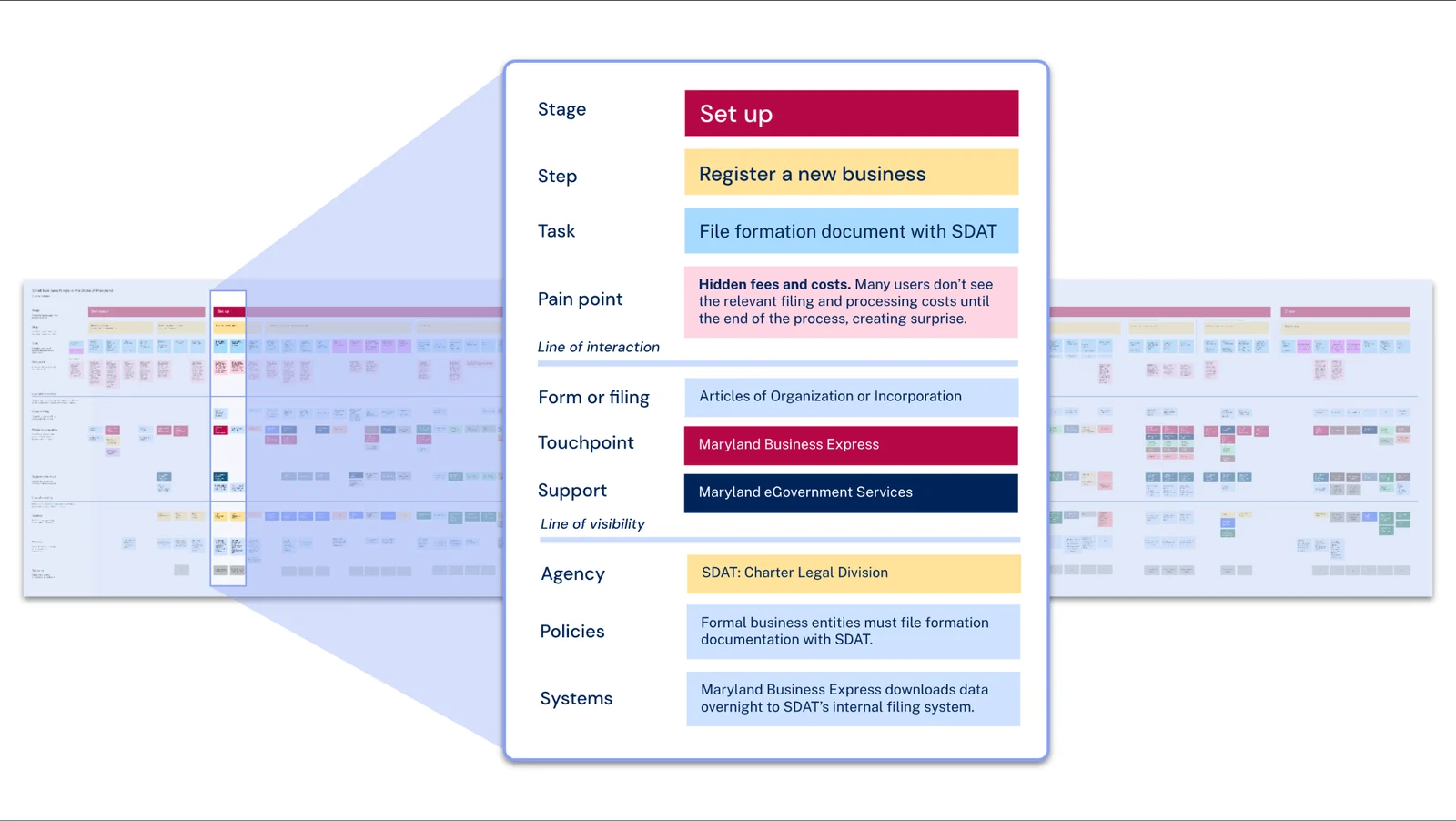
Image description
The zoomed-in column shows one task. Stage: Set up. Step: Register a new business. Task: File formation document with SDAT. Pain point: Hidden fees and costs; many users don’t see the relevant filing and processing costs until the end of the process, creating surprise. Below the line of interaction: Form or filing: Articles of Organization or Incorporation. Touchpoint: Maryland Business Express. Support: Maryland eGovernment Services. Below the line of visibility: Agency: SDAT Charter Legal Division. Policies: Formal business entities must file formation documentation with SDAT. Systems: Maryland Business Express downloads data overnight to SDAT’s internal filing system.
2.5Limits of this report
We spoke with seven small businesses, so our findings explain patterns and their causes rather than how common each problem is across Maryland. We did not hear directly from the Secretary of State, licensing agencies outside Labor, or county and city governments, which handle many requirements businesses must meet. Our review of State systems relied on public information and test accounts. Some details agencies shared with us, such as call volumes, have not been independently verified.
Back to top3.0What we’ve learned from small businesses
Maryland leaves businesses to navigate the filing process themselves: figuring out which requirements apply, skipping those that don’t, remembering what they did in the past, and making sure everything is correct.
3.1Small businesses struggle to understand the full set of requirements
Small businesses spend a lot of time figuring out what they need to do to register and file with the State of Maryland. Because information is spread across different State websites, it can be hard to know whether they have the full picture or are missing something important.
“It’s not very straightforward, because even though you start at Maryland [Business] Express and there are some items… There’s not really a workflow that says, once you have employees, you need to file with the Department of Labor… It’s not all encompassing.”
As a result, the State is often just one of many sources businesses use to understand their obligations. Many tech-savvy business owners turn to AI assistants like ChatGPT or Claude, which can pull together information from different State websites and make it easier to understand. According to a 2025 report by the U.S. Chamber of Commerce, 56% of small businesses in Maryland use AI platforms, which may include navigating State filings.
“Claude […] is faster. I could look at Maryland websites [myself] and I could miss or not see this one that might have additional information that creates nuance for the question I’m asking. I can throw Claude out there, he’ll read them all […] having all the information come into one thing quickly.”
3.2Small businesses have to stitch together a fragmented ecosystem of State systems, agencies, and processes
State services are organized around agencies, programs, websites, and portals. Related requirements often span multiple systems, and businesses must figure out how they connect and in what order. For example, a business must get an entity ID from SDAT through Business Express before it can register for tax accounts through Tax Connect. These are separate systems with separate logins, workflows, and information.
“I think the State of Maryland actually has more websites that you have to maintain [than] the Federal government… it’s quite a bit of different websites to figure out.”
Even when agencies try to connect services, businesses may still face awkward handoffs between websites and processes. Applying for a Professional Engineers Firm Permit, for example, involves finding instructions on the Maryland Department of Labor website, creating a permit record in OneStop, and completing an application on a separate platform.
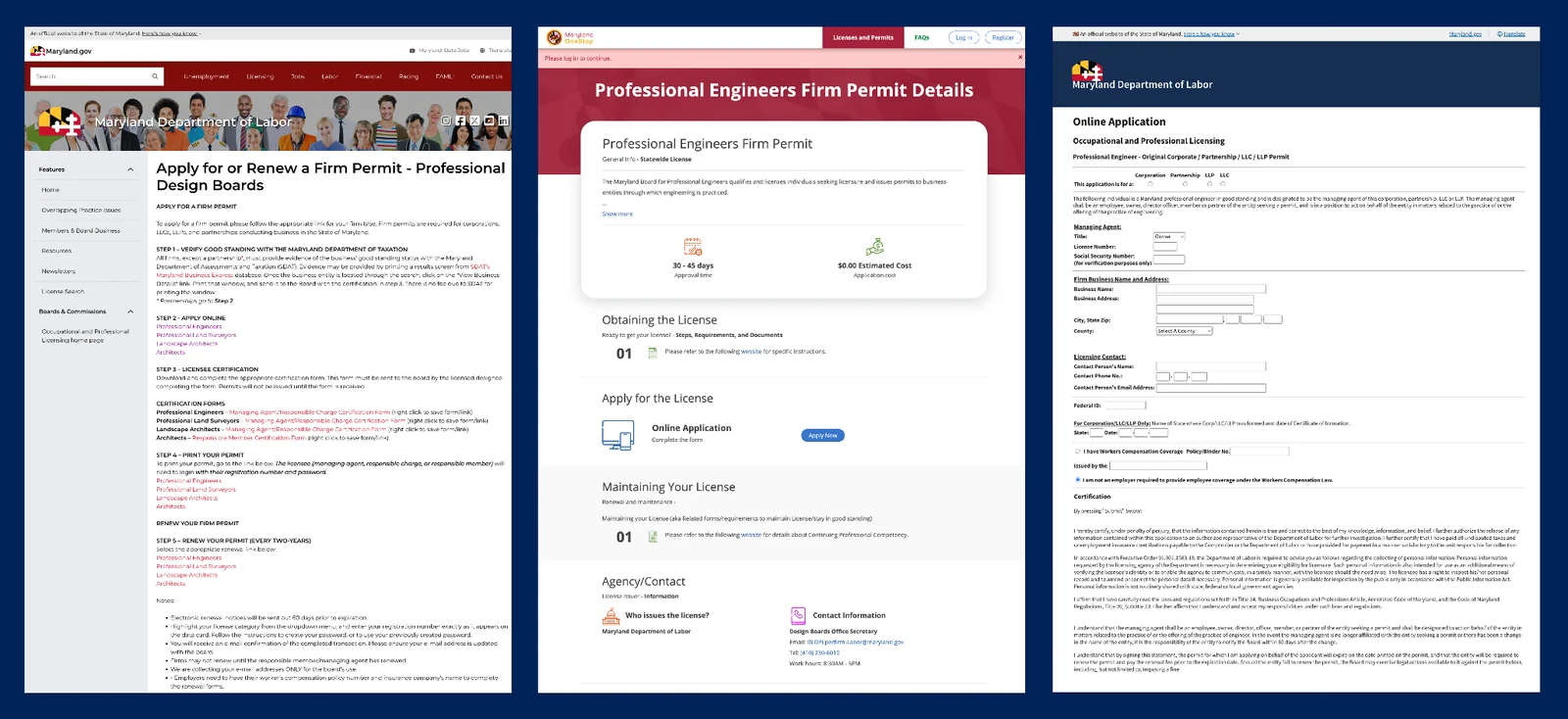
Image description
Three screenshots, left to right. First, the Maryland Department of Labor page “Apply for or Renew a Firm Permit – Professional Design Boards,” with five numbered steps: verify good standing with SDAT, apply online, complete a licensee certification, print the permit, and renew every two years. Second, the OneStop page “Professional Engineers Firm Permit Details,” showing a 30–45 day approval time and $0.00 estimated cost, with sections for obtaining, applying for, and maintaining the license that each point to another website. Third, the Department of Labor’s separate online application for a Professional Engineer corporate, partnership, LLC or LLP permit, which asks for managing agent, firm, and licensing contact details.
Guidance can also fall short when requirements cross agency boundaries. Small businesses found Business Express’s licensing guidance too vague to be useful. No single agency may have a clear view of the full process when it spans multiple agencies and levels of government. As a result, businesses have to figure out where to go and what to do next.
3.3Small businesses have to remember past filings and re-enter information often
State systems don’t consistently carry information from one filing to the next, leaving businesses to remember what they did before. For example, someone filing a recurring tax return may need to look up the NAICS code they used last time because the system doesn’t recall it. Businesses often turn to past filings and personal notes to find information they need.
Recurring filings should get easier over time. But businesses feel like they’re starting from scratch each year because the State doesn’t remember for them.
“And you kind of have to remember or figure it out [again], or make yourself a note in your manila folder, which is what I did. Because I was so tired of getting it wrong or missing [a question].”
Annual filings are especially challenging because they happen infrequently, so businesses often have to research the process all over again. Businesses want reminders that explain what to do, where to do it, and link directly to the right place. They also want systems to remember previous answers.
“Every time I need to file with the State, I find myself Googling or doing research all over again.”
3.4Small businesses have to filter out information that isn’t relevant to them
Businesses are frustrated by having to sort through information, forms, and questions that don’t apply to them. While Business Express tells businesses to research the licenses they may need, and OneStop helps them find and complete licensing applications, neither helps them determine which licenses might apply to their specific business.
The same problem appears in individual forms. Even when the State already has information about a business, forms don’t always use it to skip irrelevant questions.
“Why are you asking me if I’m selling produce? I have a condo in Ocean City, it’s the same condo I’ve [rented out] since 2014. Nothing’s changed.”
One business, for example, is asked about farm and livestock equipment on its business personal property return every year. The owner called the form “the bane of my existence.”
“You’re a roadside farmstand. You should only answer questions about a roadside farmstand.”
3.5When the system doesn’t provide enough certainty, small businesses turn to outside professionals for help and validation
Businesses need more than instructions; they need confidence that they’re doing things correctly. When they can’t tell what applies, what’s due, or whether they’ve completed a filing correctly, they turn to accountants, lawyers, payroll providers, trade associations, and peers. This shifts the burden of navigating State requirements to outside professionals. Businesses that can’t afford that help are left to figure things out on their own.
“You have to be pretty far into a business to justify paying that kind of money [for an accountant].”
Uncertainty also makes it harder to plan ahead. Rather than knowing what’s due and when, businesses find ways to check after the fact. One business regularly checks its good-standing status to see whether anything is missing. And mistakes are only flagged once a filing is rejected, which often means double the filing fees for businesses.
3.6Small businesses need business-level identity and access, not just individual accounts
Small businesses often rely on multiple people to manage State requirements, including owners, partners, employees, and outside professionals. But State systems are typically set up for individual users, not shared access on behalf of a business.
“My partners can’t get in unless I let them know my password… that kind of defeats the purpose of me having a unique username and password. We just share it [with each other].”
This makes collaboration difficult and can lead to risky workarounds, such as sharing passwords. Businesses also worry about losing access when someone who manages their filings leaves. One owner said she wouldn’t be able to pay quarterly taxes if her bookkeeper left. Owners want to see what’s been filed on their behalf and retain control of their accounts.
“My accountant is set up with everything. I believe he does that through his own portal, but I’m not actually sure.”
Account setup and identity verification also vary across State websites, making it harder to manage who has access. Signing in can be frustrating, too. One owner said her password manager regularly selects the wrong credentials because it can’t distinguish Maryland’s websites. Another called repeated two-factor authentication prompts “harassment” and questioned why she has to change her password every time she pays sales and use tax.
Back to top4.0What we’ve learned from agencies
From inside any one agency, it’s hard to see how its systems connect to or conflict with others. That’s a natural result of systems built separately by different agencies at different times. Each agency knows its own processes, but no one has a view of the end-to-end experience.
Agencies see many of the same problems businesses do. They also see problems businesses can’t, such as records that don’t match across agencies, paper filings staff must enter by hand, and notices that stop reaching anyone when staff leave.
4.1Each agency’s “single” front door works against the idea of a single entry point
Agencies want businesses to find information and complete tasks in one place. But each agency has worked toward this on its own, so businesses now face several overlapping websites and portals instead of one.
Businesses navigate at least six sets of information and four places to complete tasks. They often need to know which agency is responsible before they can find what they need, or they must decide which guidance to follow if websites overlap or conflict. Guidance on starting a business, for example, appears on both Business Express and the Comptroller’s website, each with different navigation, terminology, and level of detail.
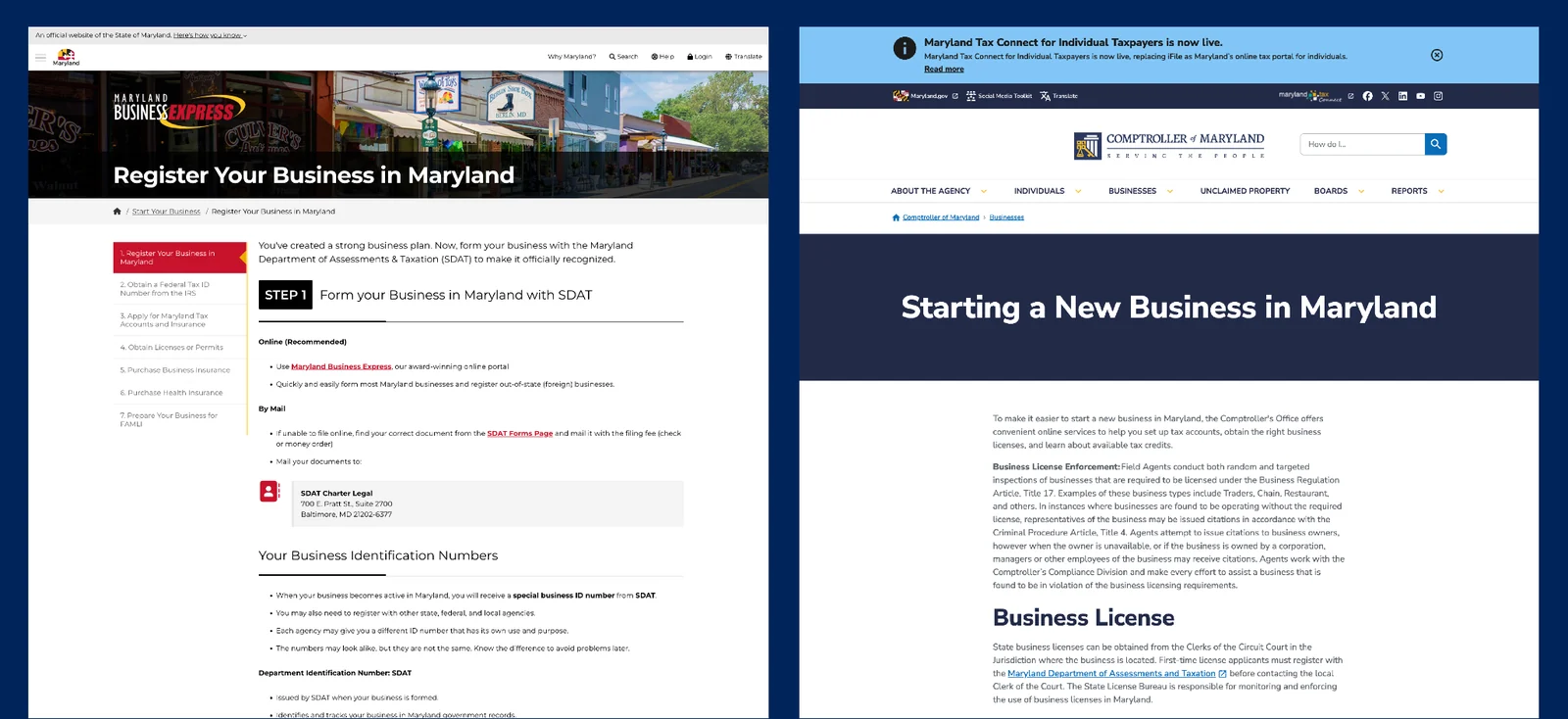
Image description
Two screenshots side by side. Left, the Business Express page “Register Your Business in Maryland,” showing step 1 of a seven-step guide (register your business, obtain a federal tax ID from the IRS, apply for Maryland tax accounts and insurance, obtain licenses or permits, purchase business insurance, purchase health insurance, and prepare for FAMLI). It explains how to form a business with SDAT online or by mail and describes business identification numbers. Right, the Comptroller of Maryland page “Starting a New Business in Maryland,” which covers business license enforcement and explains that state business licenses come from the Clerk of the Circuit Court.
OneStop aims to bring State licenses, permits, forms, and registrations together, but it works more like a catalog than a guide. Businesses must know what to search for and piece together the results, and they often land on other agency websites without context. Many popular licenses and permits are missing. Meanwhile, some of OneStop’s most-used applications are SDAT’s Homestead and Homeowners tax credits, which are neither licenses nor permits.
Business Express was created about nine years ago to be the single source of information for SDAT tasks, and keeping it accurate has been a challenge. SDAT expects more flexibility to update it once its legacy system is replaced in the next 2–3 years, but right now the website has no content management system (CMS), so agency staff can’t edit it themselves. Updates go through the vendor, and larger changes cost extra.
The Comptroller plans to add a unified search across Business Express, Tax Connect, and MyCOMConnect. While this will solve some problems, they recognize that search can’t fix gaps or conflicting content between systems.
Some newer efforts point to a different approach:
-
Labor’s website has an llms.txt file, which directs AI tools to its official content.
-
SDAT plans to publish its own llms.txt file in 2027, after moving its website to Drupal.
-
The Maryland Community Compass, built by the Governor’s State Innovation Team, gathers funding and tax credit information from several sources using AI.
In these cases, the official information is kept in one shared structure that many websites and tools can use. But as long as older websites remain, businesses can’t tell which source to trust. Maryland needs one set of official information that all front doors draw from.
4.2Agencies use different language for similar requirements
Agencies often organize and name similar requirements differently. OneStop groups licenses as “professional,” “organizational,” and “personal.” Business Express uses “basic business,” “trader’s,” and “occupational or professional.” Neither system is wrong, but businesses have to translate between them.
Agency staff get confused too. One agency described the Comptroller’s Central Registration Number (CRN) and the SDAT ID as the same number. We heard at least four different names for the SDAT ID, depending on who we spoke with. A shared vocabulary would help businesses recognize requirements and give agencies a common way to describe and link their services.
4.3Businesses do the integration work between agencies
No single agency can see every step a business takes across State systems, so problems in the handoffs go unnoticed. Registration is a clear example. Businesses can register for tax accounts in two different systems, each with its own version of the application. Both request an SDAT ID, which can take 7–10 business days to arrive, but Maryland Business Express requires the ID, while the Comptroller lists it as optional. If the business doesn’t wait to receive the ID first, they can end up registered with the Comptroller without any connection back to their SDAT registration, preventing agencies from being able to match their data.

Image description
Actions in order, with prerequisites: 1. Create Maryland Business Express account. 2. Apply to register business with SDAT; requires company name, entity type, license, resident agent, and owner information. 3. Certify, submit, make payment. 4. Receive SDAT ID. 5. Apply for and receive federal EIN from IRS; requires SDAT ID. 6. Complete Central Registration Application; requires SDAT ID, federal EIN, tax types needed, and NAICS code.
Other dependencies are just as unclear:
-
Businesses can’t get an Unemployment Insurance (UI) account number until they pay wages. This confuses businesses that try to set up an account before hiring.
-
Getting a federal Employer Identification Number (EIN) before checking that a name is available in Maryland can cause conflicts.
Businesses also carry documents between agencies, such as proof of good standing or tax compliance. These handoffs create work for applicants and slow down processing.
Mistakes cost both sides. SDAT often rejects filings that are missing a designator such as “LLC”, or that use a name already taken. Each rejected filing goes back into a backlog that SDAT doesn’t clear daily, and can lead to more calls.
Paper filings add manual work. Almost all business formations (96%) are filed online, but only 70–75% of annual reports are, which leaves roughly 90,000 paper filings. Businesses use paper because of practical limits, such as OneStop’s 4 MB upload limit, Business Express’s one-signature limit, and forms that exist only on paper. Agencies agree paper must stay an option, but better online filing would reduce how much staff have to enter by hand.
4.4Business records don’t match across agencies, but the tools to connect them exist
Agencies have difficulty reconciling their records with one another, partly because they each use unique identifiers. SDAT relies on the SDAT ID they issue, while the Comptroller relies on a Central Registration Number, and does not request an SDAT ID. SDAT and the Comptroller’s Office previously ran an annual comparison of business registrations across their systems, but discontinued it in 2016. Their last attempt returned a 2% match rate, even though regulation requires the records to match.
Identifiers also don’t line up one-to-one:
-
One EIN can have six CRNs.
-
A sole proprietor with no employees never gets a UI account number.
-
Business names don’t always match across systems.
The State already has precedents to build on:
-
Maryland has shared data platforms and governance: MDX, Databricks, some existing data sharing agreements, and the Maryland Longitudinal Data System.
-
Data already moves between agencies, for example for trader’s licenses, MarylandSaves waivers, and Labor’s cross-checks with the Comptroller.
-
SDAT offers database queries that return full business records. Three agencies already use them under formal agreements.
-
The Comptroller plans a central check for good standing and tax compliance, replacing data that is currently a day old.
-
Maryland Benefits already matches people across agency systems using master data management and AI, and has offered to share what it has learned.
The main barriers aren’t technical. Agencies pointed to legal authority, data ownership, security, and culture. They want data quality and governance in place first. Agencies that hold sensitive data won’t share it without classification rules and agreements. Agencies also disagree on the goal. Some would merge identifiers, while others prefer matching records or a crosswalk that links each agency’s identifiers.
4.5Ongoing obligations are hard to track, and notices fail
Agencies told us one of the most common questions from small businesses is “What do I do next?” Yet each agency assumes businesses already know their obligations, and few give guidance ahead of time. Timing is important: A business registers with SDAT when it forms, usually with the Comptroller as taxes approach, and with UI only once it pays wages. If guidance comes too early, it’s ignored. If it comes too late, businesses have already faced penalties.
To stay in good standing, a business must keep up with obligations from different agencies on different schedules:
-
An annual report to SDAT by April 15, whether or not it earned income that year
-
Quarterly UI reports, even when it paid no wages
-
MarylandSaves fee waivers, filed with MarylandSaves and SDAT on different timelines
-
Trader’s license renewals, managed by the Maryland courts
-
Tax filings on schedules set by the Comptroller
Nonprofits face their own version of this. Many small nonprofits, like a PTA, are run by volunteers and change hands often. Nonprofits face at least three annual deadlines from three different entities and many find out they’re delinquent only when they apply for a grant.
Some portals show what’s due. The Comptroller’s new tax platform shows upcoming payments, SDAT’s landing page shows filing status, and Labor’s UI portal shows what’s owed. But nothing shows a business everything it owes across the State. Labor still sees ongoing delinquencies, partly because many businesses work through accountants and third-party agents.
Few agencies send reminders, and the notices that do exist are easy to miss:
-
Labor emails ask businesses to check their portal, instead of sending the notice itself.
-
SDAT sends deadline reminders only to people on an opt-in mailing list.
-
The Comptroller emails reminders to its database but the portal itself has no reminders.
-
Many important notices still go by mail.
When the person who holds the login or gets the mail leaves, notices stop reaching anyone and penalties build up. Agencies estimate that about 10 million entities are on the books, most of them abandoned, and that some businesses re-form under new names to avoid the annual fee. Some of this reflects obligations businesses never understood or lost track of.
4.6Support is fragmented: no one knows the whole journey
No single support channel covers Business Express, Tax Connect, OneStop, and BEACON. A question that crosses agencies, or even different parts of one agency, may mean contacting several people. Staff told us they can only answer questions about their own agency, yet every agency gets calls meant for others. SDAT’s contact center, for example, fields licensing questions it can’t answer. Most agencies also keep program support and technical support completely separate. Fragmented support also hides patterns. A question that comes up often in one channel may be invisible to other agencies, even when the cause crosses systems.
Even State staff struggle to get the full picture. To learn nonprofits’ requirements and deadlines, Maryland’s Nonprofit Navigator at the Department of Commerce had to ask each agency directly, because the information online wasn’t clear or complete. The most complete step-by-step guide comes from Maryland Nonprofits, a private membership association.
4.7Identity and access work differently in every system
Identity and access involve several separate layers that are easy to blur together. Proving who you are is not the same as signing in. Neither one shows which business you represent, or what you’re allowed to do for it. Maryland systems handle each of these layers differently.
- Identity proofing: Verify identity
- Is this a real person, and who are they?
- Authentication: Sign in
- Is it the same person returning?
- Federation: Share across systems
- Can another system trust this?
- Business representation: Link to a business
- Which business does this individual represent?
- Authorization: Set permissions
- What can this individual do for this business?
Identity proofing: Verify identity. Some current systems check that a person is who they say they are, but each one uses its own approach. Agencies have to balance stopping fraud against keeping services easy for legitimate businesses to use.
Authentication: Sign in. Businesses need separate logins for Business Express, Tax Connect, OneStop, and MyCOMConnect, to name just a few, and the accounts work differently. Business Express shows several businesses under one account, while Tax Connect allows only one business per login.
The Comptroller estimates that about 40% of its calls are about accounts and signing in. Their office currently requires passwords to be changed every 90 days, based on federal tax security guidance. Their security team plans to review whether this rule applies to taxpayer accounts, and whether practices in NIST SP 800-63B, such as phishing-resistant multi-factor sign-in without forced resets, could replace it.
Federation: Share across systems. Right now, systems don’t accept each other’s sign-in credentials or identity checks, so businesses create a new account and may repeat the same checks for each system.
Business representation: Link to a business. Confirming that someone can act for a particular business is harder. Identity services for businesses are less developed than those for individuals. Linking people to businesses across systems also depends on matching business records, which agencies struggle to do today (4.4).
Authorization: Set permissions. More than half of employers use an accountant, payroll software, or a payroll provider, and each system handles shared access differently:
-
Tax Connect lets businesses add authorized users with partial or full permissions.
-
BEACON supports multiple administrators, powers of attorney, and agent IDs.
-
OneStop lets people claim a business record and invite others to help manage it.
-
Business Express has no way to share access.
Accountants may have to set up access separately in each system, with little guidance from the State. Where a system doesn’t allow sharing, people share passwords, which makes it hard to tell who used an account. NIST guidance warns against shared accounts. Small nonprofits are especially exposed. With high volunteer turnover, one or two people often share a login, and the organization can lose access when they leave.
Agencies recognize the need for one credential that works across systems, but they don’t agree on how to get there:
-
DoIT is in the early stages of developing a State-owned credential.
-
FAMLI recently launched a system that uses Login.gov.
-
Agencies that want a more secure credential sooner aren’t sure which one to choose. Most would prefer one that Marylanders already use, such as ID.me, which the IRS uses, or Login.gov, which FAMLI uses.
These separate efforts aren’t capable of producing a consistent cross-agency approach. The longer it takes for the state to coordinate an approach, the higher the risk that each agency continues on separate paths, investing more time and effort in deeper fragmentation.
4.8Agencies want change, but constraints and unclear ways of working together hold them back
The biggest barrier is that no one owns the business experience across agencies. Maryland Digital Service (MDDS) staff are funded one agency at a time, and leadership turnover at MDDS makes it even less clear who would coordinate multi-agency work. This kind of work needs shared priorities, resources, and accountability, and some of it, like a central identity service, would also require legislative authority.
Concerns about risk and liability also shape what agencies will change. Agencies avoid guidance that could look like legal advice. For example, SDAT won’t advise businesses on entity type or help complete forms, and the Good Standing Checklist it links from the annual report filing page sticks to general steps. (The Comptroller’s helpline, by contrast, says staff do guide callers on which tax accounts to open.) Labor explained that information a business enters itself may serve as its own attestation, and prefilling it could shift responsibility to the agency. This makes agencies reluctant to remove questions or simplify steps.
Agencies are also up against vendor contracts and older systems that make change difficult:
-
Business Express: Content changes go through the vendor, Tyler Technologies. Larger changes can mean extra fees or contract amendments.
-
Tax Connect: The system runs on commercial software from RSI, so changes can affect other states that use the same product.
-
BEACON: Labor’s vendor-run system is hard to modify because [reason].
-
OneStop: Proprietary software limits what State staff can change.
A history of stalled efforts adds doubt. Agencies described some problems as nearly 20 years old and pointed to past attempts at a unified experience, including Business Express itself and cross-agency working groups, that lost momentum.
Agencies valued working through shared problems together. One described the turnout at our MEDCO cross-agency workshop as “a huge positive sign.” Lasting progress will depend on clear ownership, funding, and a practical way to keep that collaboration going.
Back to top5.0Recommendations for a more connected filing experience
Our long-term vision for small businesses filing in Maryland is more connected:
-
Businesses go to one place to get started, understand what applies to them, and trust the list of tasks they’re given.
-
Information they provide is reused, so they don’t enter it again.
-
As they run their business, they can see upcoming deadlines across agencies.
This doesn’t require moving everything to one place, especially right away. Maryland can connect existing services and prioritize what’s feasible now, so businesses experience the State as one connected service rather than a set of separate agencies.
Our recommendations are technology-agnostic and account for fraud, privacy, and security from the start. They also assume Maryland owns what it builds, so the State can update its content and reuse research, design, and technical assets across agencies, whether it works with vendors or an in-house team.
In Appendix D, we’ve drafted artifacts to help agencies get started on the recommendations, such as the list of requirements for different businesses, and an inventory of State ID numbers.
5.1Help businesses understand what applies to them
Businesses should be able to find accurate information, understand which requirements apply to them, and know where to go next.
5.1.1Agree on one list of State requirements for businesses
Each agency should write a short, plain-language summary of the steps a business must take with them to register and maintain good standing. Then, agencies should work together to create and agree on one universal list of the State’s requirements. The list should include each step, which agency owns it, what triggers it, and in what order.
When other agencies need to refer to a step they don’t own, they can use the language from this universal list, and link back to the other agency for details. Only one detailed page should exist for each requirement. Each agency is responsible for keeping their own steps current.
First step
We’ve identified the required steps across agencies, what businesses need to complete them, which agency owns each requirement, and the webpages that describe them (Appendix D.1). Agencies should:
-
Confirm which page is the official, detailed source for each step
-
Update that page as needed
-
Remove any redundant or conflicting pages
-
Decide who will be responsible for working with other agencies to create the universal list and keeping each summary current
| Step | What businesses need to know | Agency | Current locations |
|---|---|---|---|
| Register with SDAT |
| SDAT | |
| Obtain an EIN from the IRS |
| IRS |
Table 1: This is an excerpt of the full list of required steps and details described in Appendix D.1.
Taking this further
To keep information accurate and consistent across the state, agencies need a shared content management system (CMS). A CMS makes it easy for a staff member to update content directly, without requiring any technical skills. It can also allow staff to easily update key information in one place and publish it to many. This can be especially useful for details that are widely distributed across different pages and/or websites, such as deadlines and fees.
5.1.2Show businesses which steps apply to them
Businesses should be able to see which State requirements apply to their situation, and in what order, without piecing it together themselves. The State can do this with a short questionnaire. A business answers a handful of questions about its situation, such as its business type, whether it is a nonprofit, whether it has employees, and what it sells. It then gets a tailored list of the registrations, filings, and licenses that apply, in order, with a link to the owning agency for each step. For example, a business learns that it needs to register for UI once it starts paying wages. The list also includes optional steps that may apply to them, such as veteran-owned or minority business certification.
What Pennsylvania is doing
Pennsylvania’s Business One-Stop Shop offers a similar checklist tool. Businesses answer a few questions and receive a customized list of the licenses, permits, forms, and contacts they need.
First step
We’ve drafted common business scenarios and their requirements (Appendix D.2). Each agency should review and correct the requirements it owns, and use this shared list as a reference to understand end-to-end filing for common business scenarios.
| Step | What to file | Agency | Prerequisites |
|---|---|---|---|
| Register with SDAT | Articles of Organization | SDAT | Available business name, Resident Agent, other third parties, plans to hire employees, NAICS code, MBE account |
| Obtain EIN | SS-4 | IRS | SDAT ID |
| Register state tax accounts | Combined Registration Application: Withholding and Business Income | Comptroller | SDAT ID, EIN, Tax Connect business account |
| Register for UI | Activate UI account in BEACON | Labor | Complete CRA, UI account number sent, BEACON employer account |
Table 2: This is an excerpt of the full list of scenarios and requirements described in Appendix D.2.
Taking this further
Agencies should expand the scenarios to cover licenses, nonprofits, and more complex business types. Before guidance covers all scenarios comprehensively, it can point people to which agency to contact for more specialized businesses, like a child care provider.
5.1.3Explain clearly what each State website and portal is for
Each of the State’s key websites and portals should say clearly what businesses can use it for. For example, one portal handles business registration and annual reports, while another handles State taxes. Those lines are clear to agencies, but currently invisible to businesses.
First step
We’ve indexed the main websites and clarified their purpose, the tasks they support, and where to direct people for other services (Appendix D.3). Using this as a starting point, agencies can create consistent descriptions of sites and their services.
| Website | Description | Tasks |
|---|---|---|
| Comptroller website | Provides information about Comptroller programs, processes, requirements, and forms. |
|
| Tax Connect | Service portal for forms and actions managed by the Comptroller. |
|
| MyCOM Connect | Help desk portal for Comptroller processes. |
|
Table 3: This is an excerpt of the full index of websites listed in Appendix D.3.
Taking this further
Agencies should each audit their own website and catalog where changes need to be made to incorporate new descriptions and remove redundant or conflicting information.
5.1.4Make it clear which information is official
Businesses should be able to find reliable, up-to-date information wherever they look, whether online, on a government website, or through an AI assistant. The State should make its official information easy to find, and remove redundant or outdated copies that could cause confusion.
First step
Start with the requirements businesses ask about most, such as forming with SDAT, registering for State taxes, and registering as an employer. Just like a business would, search online using Google and other AI tools. Then, write a list of every page that comes up, including different State webpages and any PDFs. The agency that owns the requirement(s) should confirm which page is official, then redirect or remove outdated copies and replace restated details with a link. Each official page states the date it was last reviewed.
Taking this further
Each agency should publish an llms.txt file to point AI tools to its official pages. Those pages should also include structured information that machines can read, such as the owning agency, the date last reviewed, and what the page covers. Publishing the shared list of requirements in 5.1.1 as open, machine-readable data would let other tools draw directly from the official source rather than maintain their own copies. Agencies should regularly check whether search engines and AI tools are directing businesses to the correct pages.
5.2Make it easier to complete filings and avoid repeating work
Businesses should be able to complete tasks, avoid errors, and not re-enter information the State already has.
5.2.1Forms only ask what applies, and catch mistakes before you submit
Forms should use plain language, skip questions that don’t apply, and flag common problems while a business owner is completing them. For example, a form might flag a business name that is already taken, or a missing “LLC” before submission, reducing avoidable rejections, delays, and burden on staff.
SDAT already does this for several filing types. It flags incorrect addresses, unregistered resident agents, and other avoidable errors, and is adding these checks to more filings.
First step
We have identified forms with common errors or unnecessary questions, which we recommend starting with:
-
Combined Registration Application (CRA) because it’s used by all businesses
-
Sales and Use Tax Return (SUTR) because it has a high use rate
-
Business Personal Property Tax because users consistently cite it as challenging
-
SDAT Annual Report because it’s used by all businesses
We’ve developed a set of recommended changes to the CRA (Appendix D.4) and SUTR (Appendix D.5) as a starting point. However, Tax Connect runs on RSI’s commercial off-the-shelf (COTS) product, which may limit how these changes can be made. Some changes may be possible through configuration, while others would require modifications to RSI’s product. Agencies should work with RSI to understand these constraints and identify what can be achieved within the existing system.
At a high-level, our proposed changes involve:
-
Simplifying form flow. Breaking questions into smaller sections and presenting one question at a time improves the user experience. It also makes it easier to add conditional logic, because inputs on one page can inform which questions show up next.
-
Adding plain language. Reframe questions so they’re easy to read and provide enough detailed context and guidance. This makes the form easier for users to understand, and reduces the need to consult external resources and instructions.
-
Prefilling information. Leverage information the agency already has about the business to remove irrelevant questions or screens.
-
Calculating automatically. Perform calculations for the user instead of requiring them to do so. Similarly, provide all necessary information, including rates, instead of asking users to look them up on a separate site.
Taking this further
Forms can only skip irrelevant questions if they know what kind of business is filing. That depends on reusing information the State already holds, and on a shared data schema so that agencies use the same field names and validation rules across their forms. Agencies should also track rejection reasons over time to see whether their changes are working. Larger changes may depend on vendor capabilities, contracts, and policy requirements.
5.2.2Ask businesses for information fewer times
The State should fill in information it already has, such as a business’s name and address. Businesses can review and update anything that has changed instead of entering it all again. Over time, this can help forms show only relevant questions and skip questions that don’t apply.
First step
Agencies should start with the details that are easiest to reuse: public information an agency already holds about a business. We have identified core business details that are collected repeatedly and should form the start of a shared data schema (Appendix D.6).
Taking this further
Reusing nonpublic information requires data-sharing agreements, reliable record matching, and common definitions and formats for information agencies collect. Agencies can start with read-only access: one agency looks up information held by another but does not change those records until record matching is reliable. Businesses should be able to review and correct reused information. This would involve tax information, so it needs a Comptroller legal and disclosure review first (7.2). Any sharing must protect privacy, security, fraud and legal responsibilities.
5.2.3Register with each agency in the right order
Some requirements depend on others. For example, a business should form with SDAT and receive its SDAT ID before it can register for State taxes with the Comptroller. Registration should check that earlier steps are complete and guide businesses through the right order.
First step
We’ve identified the preferred sequence of steps. Agencies should update their websites to reflect it, and consider removing or de-emphasizing alternative paths. SDAT and the Comptroller should evaluate whether to require a valid SDAT ID on the CRA, to improve record matching.
Optimal sequence of events
-
Register with SDAT
-
Obtain EIN
-
Apply for federal tax exemption (Nonprofit only)
-
Register with Comptroller (Combined Registration Application)
-
Apply for state tax exemption (Nonprofit only)
-
Register with Secretary of State (Nonprofit only)
-
Apply for state Sales and Use and/or property tax exemption
-
Register for Unemployment Insurance
-
Register for Workers’ Compensation Insurance
-
Register with FAMLI
-
Register with MarylandSaves
-
Apply for license(s)
Table 4: Lists the optimal sequence that a business should follow.
Taking this further
Agencies should use the agreed sequence to coordinate registration across systems. For example, SDAT and the Comptroller could analyze whether to remove the CRA from Business Express and prioritize the Tax Connect version. This may involve reviewing current usage data and putting redirects in place to encourage businesses to use Tax Connect.
As businesses complete each step, the next agency could recognize that requirement as complete and guide them to the next one. Over time, this approach could reduce duplicate questions and prevent businesses from starting a registration without the information they need.
5.2.4Report wages once
The DoL should let employers submit quarterly wage information once for both Unemployment Insurance (UI) and FAMLI. A shared filing would simplify reporting for employers every quarter, including those with no wages to report, and reduce duplicate work at scale.
First step
Labor should map where wage reports in BEACON and FAMLI overlap, and identify whether one report can feed the other.
Taking this further
A single report may be a useful later step. However, that would depend on changes to both systems, vendor contracts, and differences in how each program defines covered wages and employers. Payroll providers that file for many employers should be part of testing.
5.2.5Build towards single sign-on
Businesses should eventually be able to sign in once and move between State systems. Today, each portal has its own login, and agencies are moving in different directions (4.7). Agencies can agree now on common standards for how people sign in and verify their identity. If each agency moves its portal toward those standards in small steps, businesses will face fewer repeated checks in the meantime. The State will also find it easier to adopt single sign-on later, whichever credential it chooses (7.4). These standards need to cover two different things. Signing in (authentication) confirms that the same person is returning. Verifying identity (identity proofing) confirms who that person is.
First step
Each agency should map how their portal works today to help identify gaps to close:
-
How do people sign in, and what are the benefits and drawbacks of that approach?
-
When, if ever, does the system verify a person’s identity, and how?
-
Does each account belong to an individual or to a business? How does the system link a person to the business they represent, and to what they’re allowed to do for it?
Taking this further
Sign-in and permissions depend on each other, so agencies should take these steps in order:
-
Make every account belong to an individual. Each account should represent one person, linked to the businesses they act for and the permissions they hold (5.2.6). This removes the need to share passwords and makes it clear who did what.
-
Set two or three assurance levels. Agencies should group tasks by risk. For example, changing a business’s ownership in SDAT calls for stronger sign-in and identity checks than viewing records. Agencies should agree on two or three levels, based on a common standard such as NIST SP 800-63. Then they should map each system’s tasks to those levels.
-
Agree on methods for each level. Agencies should decide which sign-in and identity verification methods meet each level, and what each system needs to change to adopt them. Then, agencies can accept each other’s identity checks at the same level.
At the end of these steps, each system still has its own sign-in, but all follow the same rules. That makes moving to a single credential much simpler. 7.4 covers how to decide which credential to use, including how to weigh costs and risks.
5.2.6Let trusted representatives act for a business
Business owners should be able to give accountants, bookkeepers, payroll providers, and other representatives permission to handle tasks on their behalf. They should control what each person can see and do, review who has access, and change or remove permissions when needed. Businesses should be able to see what has been filed on their behalf, and take over responsibilities if a representative makes a mistake or leaves.
First step
Agencies should assess their existing user accounts, roles, and permissions against the needs we have illustrated below and the personas available in Appendix D.7. They should identify gaps and opportunities in how representatives are authorized, what they can do, and how access is changed or revoked. Agency legal teams should also compare power of attorney forms and requirements to identify where a common form could be accepted.
Across State platforms, businesses and their representatives need to be able to:
-
Manage access: Authorize representatives, assign specific permissions, review who has access, and change or revoke access when responsibilities change.
-
Protect individual accounts: Each person signs in using their own credentials. Representatives do not share the business owner’s login.
-
Limit permissions: Representatives can see and do only what the business has authorized them to do.
-
Maintain visibility and accountability: Businesses can see who performed an action on their behalf and when.
-
Maintain continuity: Businesses can recover access when an owner, employee, or representative leaves, without losing control of their accounts.
-
Manage multiple clients: Representatives can select a business, understand their permissions for that business, and act on its behalf.
-
Support delegated responsibilities: Representatives can receive relevant reminders, access filing guidance, and contact agencies about tasks they are authorized to handle.
Taking this further
Verifying someone’s identity (5.2.5) does not establish their authority to act for a business. Agencies should agree on a common way to identify a business’s owners and authorized representatives, manage their permissions, and verify who can act on the business’s behalf. This would let agencies recognize existing authorization, rather than require businesses to establish it separately for each service. Also, a common power of attorney form may require regulatory or statutory changes.
5.2.7Create a plain-language guide to business identification numbers
Businesses should be able to understand each identification number they receive. A plain-language guide that explains what each number identifies, where to find it, and what it is used for would help businesses know what they need when it’s time to file. Over time, the State could also make it easier for businesses to find all the ID numbers associated with their business in one place.
First step
Agencies should validate the information in our inventory of State identification numbers (Appendix D.8), and add details such as its format and when it is needed. The State should publish this information as a plain-language glossary. The glossary should also include each number’s format, length, and common names or abbreviations, as well as examples of when a business will be asked to provide it.
| ID type | Issuing agency | What it identifies or confirms | Where to find it |
|---|---|---|---|
| SDAT ID (Department ID) | SDAT | The business entity in SDAT records | Approval email; Business Express account |
| Combined Registration Number (CRN) | Comptroller | The business or its tax registration account | Maryland Tax Connect account |
Table 6: This is an excerpt of the full index of identification numbers listed in Appendix D.8.
Taking this further
Agencies should make their ID numbers easy to find in signed-in accounts, registration confirmations, and notices. Showing all of a business’s ID numbers together is a later step that depends on reliable record matching (7.2). Over time, agencies can also assess whether some numbers can be combined, or whether each agency needs to keep its own.
5.2.8Stop requiring businesses to carry documents between agencies
When one agency needs information that another already has, it should verify that information directly with the issuing agency instead of asking the business to do it for them. This could reduce repeat paperwork and avoid delays while businesses wait for documents.
First step
We identified three types of documents that businesses may be asked to obtain from one agency and submit to another. Agencies should review these examples, confirm which agency holds the original, and determine whether the receiving agency can get the information directly rather than asking the business to provide it.
Certificate of Status / Good Standing Certificate
Issued by SDAT to confirm that a business is in good standing. Other agencies, like Labor, Comptroller, and DOSEM, may request it for licensing, tax credits, exemptions, or certifications.
Clearance Letter / Tax Clearance
Issued by the Comptroller or Labor to confirm that a business has resolved outstanding tax or compliance issues. The Workers’ Comp Commission separately issues Certificates of Compliance. Other agencies may request these documents for reinstatement, licensing, or contract approvals.
Governing Documents
Filed with SDAT to establish a business’s legal structure and governance, such as Articles of Incorporation and bylaws. Other agencies may request them for specific purposes, such as Labor for licensing decisions or the Secretary of State for nonprofit registration.
Taking this further
Broader information sharing will require appropriate data-sharing agreements, clear rules for access to sensitive information, like tax information, and reliable ways to match records to the correct business (7.2). Agencies should assess data quality, legal requirements, and governance arrangements before expanding direct verification to additional documents and use cases.
5.2.9Make more filings available online
Businesses should be able to complete any filings online, including those that require large attachments or multiple signatures, without switching to paper. Paper should remain an option for those who need or prefer it, but current paper-only filings should be online too.
First step
We have identified several high-impact filings that still require paper or limit who can file online. Agencies should validate this list, identify any additional examples, and assess what would be needed to remove these limitations.
Filings with paper requirements or online limitations
-
Annual Reports and Personal Property Tax Returns: Certain business types cannot file these returns online and must use paper forms. These include:
-
Government entities
-
Financial institutions, including credit unions, banks, savings banks, savings and loan companies, and trust companies
-
Nonstock cooperatives
-
Unincorporated rental property owners in Worcester County and Ocean City
-
Public utilities and cable providers
-
-
Certain tax accounts and exemptions: Applications for alcohol, tobacco, and motor fuel tax accounts, as well as sales and use tax exemption certificates, require paper submission.
Taking this further
Agencies should assess whether their existing systems can support larger document uploads, multiple electronic signatures, and fully online submission and processing. Where they cannot, agencies should identify the changes needed, and consider vendor contracts, technical constraints, and legal requirements. They should also consider whether these capabilities can be shared across systems rather than developed separately by each agency.
5.3Help businesses keep track of their responsibilities
Businesses should be able to manage deadlines, follow progress, get support, and stay informed.
5.3.1Reminders that tell businesses what they need to do
Businesses should be able to see upcoming deadlines and obligations across agencies and receive reminders before they are due. Reminders should explain what needs to be filed, what information or documents to prepare, and where to file by what date, with a direct link. This is especially important for recurring filings, which businesses may need to look up again each year. Businesses should also be able to choose how they receive reminders.
First step
We’ve identified common recurring obligations and their deadlines (Appendix D.9). Agencies should validate this information and add the practical filing guidance described above. Then select a manageable set of obligations and test how useful reminders could be delivered through existing systems.
| Business type | Filing | Agency | Frequency | Deadline |
|---|---|---|---|---|
| Most | Annual Report | SDAT | Annually | April 15th |
| Most | Corporate Estimated Tax Return | Comptroller | Quarterly | The 15th of the month after that quarter ends |
| Has employees | Insurer Annual Summary Report | Workers’ Comp Commission | Annually | No publicly listed deadline |
Table 7: This is an excerpt of the full index of ongoing filings listed in Appendix D.9.
Taking this further
Agencies need to share and maintain accurate, up-to-date information on filing requirements, deadlines, instructions, and links. Reminders should reach the people responsible for each filing, whether a business owner, accountant, bookkeeper, or payroll provider. This requires reliable record matching (7.2) and clear rules for access and notifications that protect privacy, prevent fraud, and account for changes in who is authorized to act for a business (5.2.6).
5.3.2Tell businesses what to do next
Filing confirmations should explain any next steps that apply to the business, rather than point everyone to a general list. For example, an Annual Report confirmation could remind businesses with employees to also file their Insurer Annual Summary Report. The screener (5.1.2) can provide consistent guidance before and after each filing. Each message should use plain language, link to the right agency, and be maintained by the agency responsible for the requirement.
First step
We’ve defined the optimal sequence of filings (5.2.3), and our service blueprint lists common ongoing obligations. Agencies should use this to improve the next-step guidance in filing confirmations, starting with SDAT’s acknowledgment letter and annual report checklist. For the annual report checklist, SDAT and the agencies whose obligations it covers should agree who is responsible for keeping each item current, and which businesses should see it.
Taking this further
Agencies should agree on which next steps apply to different business situations, and how to keep that guidance accurate as requirements change. The screener can help businesses identify the steps that apply to them, while shared content standards can help agencies maintain consistent, up-to-date information. Tailoring content will also depend on having enough information about a business to determine which requirements apply.
5.3.3Show businesses what matters most after they sign in
Most agencies already have a page or dashboard that businesses see after signing in, but these vary across platforms and can make important information hard to find. Businesses told us that recurring tasks matter most. Agencies should update their dashboards to follow a common layout so businesses can find the same types of prioritized information in familiar places.
For example, a business that files sales and use tax returns every quarter should see its next return, due date, and a direct link to file as soon as it signs in, rather than search through every task the portal offers.
First step
Each agency with an online filing portal should compare its dashboard with the content model described here, and identify changes it can make using the information it already has. Start by moving upcoming deadlines and frequently used tasks to the top. Agencies should also ask their vendors whether these features are already available but not enabled.
| Field | Description |
|---|---|
| Due next | Upcoming obligations and due dates |
| Filing status | Current status of recent (3 months) submissions |
| Frequent tasks | Common filings for that business based on requirements and past actions |
| Account information | Business’s ID number for that agency |
| Team members | List of those who can or have been delegated tasks and their level of access |
| Related services | Links to relevant actions at other agencies |
Table 8: This content model describes the fields that should be included in each online filing portal.
Taking this further
Maryland could eventually give businesses a cross-agency view of their obligations and account information in one place. This would depend on a shared identity standard (7.4), reliable record matching (7.2), and agreement on what information agencies can share and who is authorized to see it. This would involve tax information, so it needs a Comptroller legal and disclosure review first (7.2). Establishing a common pattern across agency dashboards now would make it easier to bring that information together later.
5.3.4Get businesses to the right place the first time they ask for help
Businesses shouldn’t need to know which agency handles a service or filing to get help. If they contact the wrong agency, staff should direct them to the right one, with a contact name or number and clear instructions when possible. Staff don’t need to answer questions about another agency’s requirements; they just need to help businesses reach the right people.
First step
Agencies should track the most common questions they receive about other agencies over a set period. They should use this information to create shared referral guidance that identifies:
-
Which agency or team handles each question
-
How to contact them directly
-
What information businesses should have ready.
Agencies can also spot where referrals send businesses in circles or from office to office.
Taking this further
Maryland could better coordinate agency contact centers so staff can answer questions or direct businesses to the right place. The shared source of business information proposed in 5.1.1 could give staff the same guidance available online. Over time, agencies could also share the context of a business’s question so it doesn’t have to explain its situation again, while following privacy and information-sharing rules, particularly for tax information (7.2).
5.3.5Show businesses where their filing stands and how long it should take to process
Businesses should know how long a filing typically takes before they submit it, and be able to check its status online afterward. Maryland can improve status updates with relatively small changes. Updates should explain delays, give clear reasons for rejections and how to fix them, and identify missing information or documents when a filing is on hold. Every update should tell businesses what is happening, whether they need to act, and what comes next. For example: “In review: No action needed. Most filings are processed within 10 business days.”
What Colorado is doing
Colorado’s permitting team found that businesses can accept long processing times when they have clear expectations and enough information to plan. But a status that simply says “in process” isn’t enough. Businesses want to know where their application stands, such as whether it is with an engineer or out for public comment.
First step
Agencies should use their processing data to publish realistic timelines for common filings wherever possible. Show these estimates before filing and in confirmation messages and online status updates. Agencies should also make status messages clearer, explaining delays, holds, and any action the business needs to take. They should use common status stages, such as received, in review, on hold, and complete, with more detail where needed.
Taking this further
Agencies need reliable processing data and a consistent way to share status updates. They should be able to track filings, explain delays, and notify businesses when timelines change. Some changes may be possible in existing systems; others may require vendor updates, system connections, or changes to internal processes.
5.3.6Create a clear guide for starting and running a nonprofit
Nonprofits face the same filing challenges as other small businesses, plus additional registrations, tax exemptions, and renewal requirements spread across multiple agencies. Organizations can mistakenly think they are finished after one registration, but miss other requirements or deadlines, putting grant funding at risk. These challenges are especially difficult for small, volunteer-run organizations. The State should provide one clear, accessible guide explaining required registrations, available State tax exemptions, and federal requirements.
First step
We’ve outlined the full set of steps that nonprofits should take (Table 4 in 5.2.3). The Nonprofit Navigator, SDAT, the Comptroller, Labor, and the Secretary of State should review and validate the requirements together, and create a plain language guide for nonprofits.
Taking this further
Agencies should coordinate to maintain nonprofit guidance, and include nonprofits in the screener (5.1.2) and reminders (5.3.1). Guidance should reflect their specific requirements, including how volunteer officers can transfer responsibilities when they change (5.2.6). It should also align with the State’s grants modernization work; missing filings can affect grant eligibility.
5.3.7Keep contacts current and alert businesses to changes in their name
Businesses should be able to update account contacts and transfer administrator access when someone leaves so that important notices reach the right people. Agencies should use plain language to explain what happened and whether action is needed. They should also notify the appropriate contacts when important account or business records change, such as a registered agent or principal office address. These alerts help businesses catch missed notices, penalties, and unauthorized changes, but they don’t confirm who can act for the business.
First step
Agencies should clarify how businesses can update contact information and add or remove administrators, and whether SDAT already notifies them when registration records change. They should rewrite common notices in plain language, explaining what happened, what action is needed, and when. Where privacy rules limit email content, agencies should test whether a brief notice with a deadline and a link to sign in is enough. SDAT should also pilot email alerts to listed contacts when key business records change.
Taking this further
Expanding alerts across agencies requires accurate contact information and agreement on which changes should trigger a notice. Alerts should also work with the representative access model in 5.2.6, so businesses know when someone acts on their behalf. They can also help detect fraud.
Back to top6.0Pilots: Starting small and building over time
Agencies raised doubts about whether cross-agency changes are feasible, given unclear ownership, limited funding, and past efforts that stalled. Three focused pilots respond to those concerns by starting small, with high-value projects that show what agencies can deliver together and test new ways of working across them.
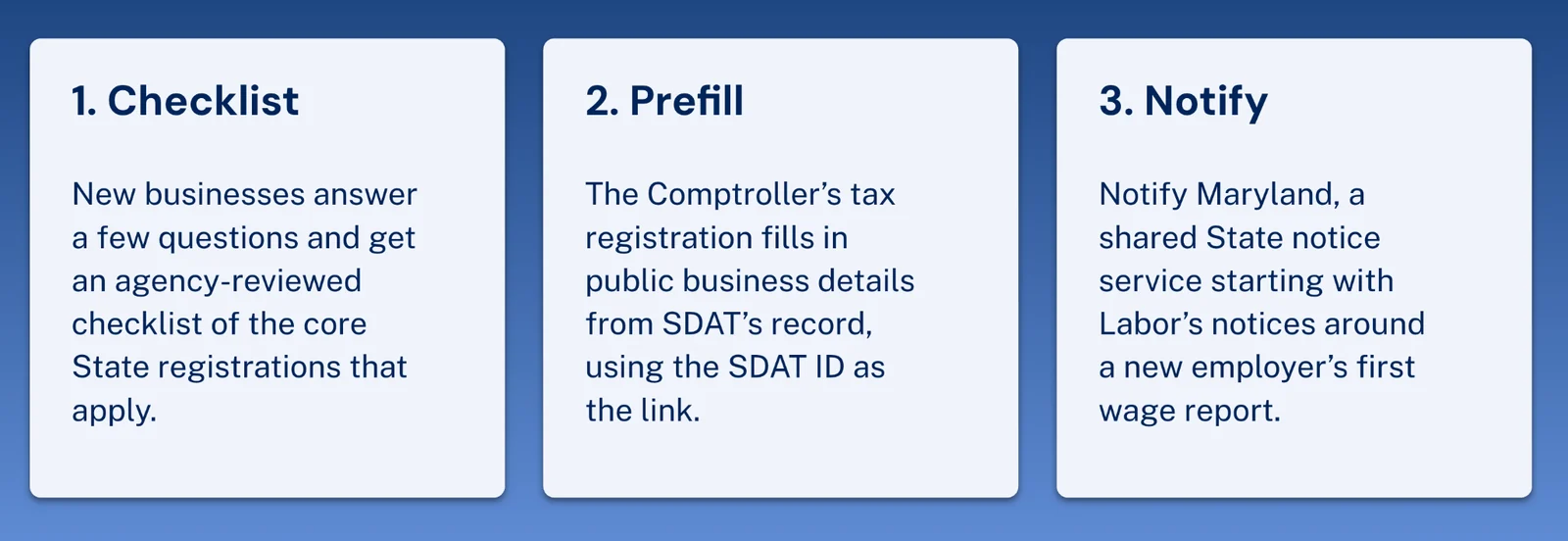
Image description
1. Checklist: New businesses answer a few questions and get an agency-reviewed checklist of the core State registrations that apply. 2. Prefill: The Comptroller’s tax registration fills in public business details from SDAT’s record, using the SDAT ID as the link. 3. Notify: Notify Maryland, a shared State notice service starting with Labor’s notices around a new employer’s first wage report.
6.1Checklist: Make it easier for businesses to know what applies
Today, figuring out what applies to a business takes weeks of searching across websites, with no clear order of steps. In the future, businesses could answer a few questions and receive a personalized checklist telling them what they need to do, in which order, with each agency.
We recommend a six-month pilot to build a checklist that covers the core State registrations most businesses need:
-
forming or registering with SDAT
-
registering for State taxes with the Comptroller
-
registering as an employer with Labor
A few questions, such as the type of business, whether it has employees, and whether it sells taxable goods, determine which steps apply. Each agency validates the information and logic for its own requirements, and takes responsibility for keeping them current. The pilot will test whether agencies can jointly create and maintain an authoritative guide to starting a business.
We built an early prototype to illustrate this idea
Deliverables (6-month pilot):
-
An agency-reviewed checklist hosted on an existing State website, with questions that determine which steps apply.
-
Updated descriptions on SDAT, Comptroller, and Labor websites explaining what each website and portal handles and where to go for other services.
-
Links to authoritative agency pages; outdated or duplicate pages redirected, or removed.
-
A defined process for agencies to maintain their information, including identifying the agency owner and last review date for each step.
-
Findings to support a decision about expanding to Stage 2.
How to measure success: Businesses can correctly identify which steps apply to them, the State receives fewer calls asking what to do next, and agencies make timely checklist updates when processes or legislation change.
Future stages: The following stages show how the pilot could grow beyond its initial scope.
- Stage 1Pilot
- A high-level checklist of key requirements from SDAT, the Comptroller, and Labor. Use AI to pre-check boxes based on how a user describes their business. No sign-in; businesses can email their checklist to themselves.
- Stage 2Expand and reuse
- Add licenses for one industry, such as home improvement contractors. Include more detail about requirements, additional agencies, and other business journeys, such as starting a nonprofit.
- Stage 3Connect the experience
- Add sign-in so users can save their checklist. Update it as they complete requirements or their business changes. Personalize it using SDAT records and connect it to reminders.
6.2Prefill: Help businesses avoid re-entering information
Today, businesses type the same details into each agency’s form, which takes time and leads to errors. In the future, the State uses what it already knows about a business to fill in forms and skip questions that don’t apply.
We recommend a six-month pilot that starts with registering for State taxes. When a business completes the Comptroller’s Combined Registration Application in Tax Connect, it enters its SDAT ID (sometimes called the Department ID Number). Tax Connect checks that the ID is valid and retrieves the business’s details from SDAT’s public record. The business reviews the prefilled information, corrects it if needed, and continues.
This lets the Comptroller reuse information SDAT already maintains, such as the business name and resident agent details, rather than asking businesses to enter it again. Each agency keeps its own systems, records, and ID numbers; the SDAT ID provides the link between them. The pilot will test whether agencies can reuse one another’s data without replacing or changing their underlying systems.
We built an early prototype to illustrate this idea
Pilot scope and safeguards:
The pilot uses only fields SDAT already publishes in its public business entity search. Because this information is already public, the pilot doesn’t require a new agreement to share sensitive data. Prefilling is read-only: the Comptroller retrieves information from SDAT, but doesn’t write changes back to its records.
Included in the pilot
-
Legal business name and trade names
-
SDAT ID
-
Business type
-
Date and state of formation
-
Principal office address
-
Resident agent name and address
-
Good standing status
Excluded from the pilot
-
EIN, NAICS code, mailing address, contacts, and employee status
-
Owner details, Social Security numbers, and other sensitive fields
-
Creating a single statewide identifier
-
Writing changes back to other agencies’ records
Deliverables (6-month pilot):
-
A lookup that uses a business’s SDAT ID to retrieve its public SDAT details.
-
An agreed process for validating SDAT IDs.
-
A Comptroller registration form that pre-fills details and asks the business to confirm.
-
Shared definitions for each prefilled field.
-
Plain-language help explaining what the SDAT ID is and where to find it.
-
A documented approach that other agencies can use to adopt the same lookup.
-
Findings to support a decision about expanding to Stage 2.
How to measure success: Fewer registrations with invalid SDAT IDs when applicable, fewer rejections due to name or address mismatches, less time to register, and a higher share of businesses accepting prefilled details.
Future stages: The following stages show how the pilot could grow beyond its initial scope.
- Stage 1Pilot
- Prefill the Comptroller’s registration from SDAT using public fields only. Read-only and confirmed by the business, with no new identifier or sensitive-data sharing agreement.
- Stage 2Expand and reuse
- A second agency, such as Labor’s Unemployment Insurance registration, adopts the same lookup. Shared field definitions grow into a shared data schema.
- Stage 3Connect the experience
- With sign-in and data-sharing agreements, add non-public details such as EIN and contacts. Checklist tasks open prefilled forms, and businesses can see their agency ID numbers together. This would involve tax information, so it needs a Comptroller legal and disclosure review first (7.2).
6.3Notify: Give businesses clear notices about what’s due next
Today, reminders are inconsistent, and often arrive only after a deadline is missed. Labor, for example, doesn’t remind employers before a wage report is due. Instead, it mails letters after the deadline has passed. In the future, agencies send clear reminders before things are due, explaining what to prepare, where to file, and how to get help.
We recommend a six-month pilot to build Notify Maryland, a shared service that agency staff can use to write and send notices themselves, without relying on vendors to make changes. A shared service would give staff more control over the timing and content of their messages.
Notify Maryland is modeled on GOV.UK Notify, a service the UK government provides to public bodies. Staff can create message templates without technical knowledge and send messages by uploading a spreadsheet or connecting an agency system through an API. A US version, Notify.gov, was piloted by Montgomery County, Maryland, and other state and local partners before GSA ended it as a shared service in 2025.
The pilot will test whether Maryland can operate a shared notification service, and whether clearer, more timely notices help businesses meet their filing deadlines.
We built an early prototype to illustrate this idea
First use case: The pilot starts with notices to new employers about their first Unemployment Insurance (UI) wage report. Labor reports that many support issues involve penalties that accumulate when the person managing an employer account leaves and deadlines are missed. Labor has about 565,000 employer accounts in delinquent status, although this figure likely includes businesses that have closed without closing their accounts.
The pilot will include four types of emails:
- After registration
- Explain when the first wage report is due, where to find it in BEACON, and how to add a second contact.
- Before report is due
- Explain what to prepare, where to file, and how to get help signing in.
- After filing
- Confirm receipt and explain when the next report is due.
- Missed deadline
- Explain what’s overdue and how to resolve it.
Pilot scope and safeguards:
-
Upload a list of email addresses from existing records. This avoids changes to BEACON or the need for an API connection.
-
Email only. It excludes text messages, API connections to agency systems, and changes to existing agency portals, and does not impact existing mail notices.
Deliverables (6-month pilot):
-
A working version of Notify Maryland that agency staff can use.
-
Rewritten Labor notices for each stage of the first wage report, tested with employers.
-
Guidance on writing effective notices within privacy limits.
-
Findings to support a decision about expanding to Stage 2.
How to measure success: Fewer first wage reports filed late or missed, fewer calls about missed notices or signing in, less time spent creating or changing notices, email delivery and open rates.
Future stages: The following stages show how the pilot could grow beyond its initial scope.
- Stage 1Pilot
- Labor sends four email notices around a new employer’s first UI wage report. Staff upload employer lists, with no changes to BEACON or Labor’s existing mailed notices.
- Stage 2Expand and reuse
- Bring on a second agency, such as SDAT for annual report reminders, through simple onboarding. Extend Labor’s notices to all quarterly wage reports and add text messages. This would involve tax information, so it needs a Comptroller legal and disclosure review first (7.2).
- Stage 3Connect the experience
- Send reminders based on a business’s checklist, notify all authorized contacts, and let businesses see notices in one place. Agency systems trigger notices through APIs. This would involve tax information, so it needs a Comptroller legal and disclosure review first (7.2).
7.0Foundations: How the State needs to work differently
The foundations describe the shared capabilities that make cross-agency improvements possible and sustainable. The State doesn’t need them in place before making changes; it can build them gradually, starting with the pilots described in this report.
7.1Work together and own what you build
Strengthening this foundation allows for:
-
A team that operates effectively across agencies, in a model that could be reused
-
A single understanding that accounts for all steps of the business experience
-
A shared content management system that empowers program staff to update content on websites and platforms
-
Decreased risk of vendor lock-in, granting the State more flexibility
-
Eventual design uniformity across agency websites
The State needs a dedicated, well-resourced team responsible for the business experience across agencies. As 4.8 describes, working groups of existing agency staff have struggled to make progress, because members coordinate alongside their regular responsibilities without the time or authority to move work forward. Separate agency contracts and vendor relationships also make it hard to build services that can be reused.
The team should be led by a product owner who is accountable for the experience across agencies, sets priorities, makes product decisions, and keeps work moving. Teams can include State staff, vendors, or both. Either way, the State must keep control of priorities, research findings, designs, and technical assets, rather than leave those decisions to vendors.
The team should also set shared standards for how agencies describe business types and requirements, explain next steps, and hand businesses off between services. A shared content management system (CMS) could help agencies apply these standards and update information quickly. This type of system places the responsibility of content updates in the hands of the people who own that information, since it requires no technical skill to use, and can publish changes instantly. The system could be built or customized in-house or by a vendor, as long as each agency can manage its own content.
Two recent State efforts address this problem in different ways. In October, the Governor created the Permitting and Licensing Acceleration Team (PLAT), a dedicated team with authority to lead reform of permitting, licensing, and certification across agencies. DoIT is also building PLX, a set of shared permitting and licensing tools that agencies can reuse. Either model, a cross-agency team or shared tools, could extend to other areas of the Maryland government.
7.2Share data and match records across agencies
Strengthening this foundation allows for:
-
Automated notifications, data transfers, and other features currently out of reach or relying on manual steps
-
Increased data quality, and a full picture of a business across state agencies to inform other improvements
-
Easier data migration and/or consolidation of databases
Because business records don’t match across agencies (4.4), businesses provide the same information repeatedly, and agencies can’t easily tell whether a business has met another agency’s requirements. Many recommendations depend on fixing this. The State should prioritize data-sharing agreements and shared data definitions (a common data schema). These are the foundation for reusing information, tailoring requirements, and connecting services.
Sharing tax information has specific legal limits. Maryland law prohibits State employees from disclosing tax information, except in cases the law specifically allows (Tax-General Article § 13-202). Federal tax information that agencies receive from the IRS has its own safeguarding rules under IRS Publication 1075, which limit who can access it and how it is stored and shared. These rules go further than general privacy requirements. The first stage of each pilot avoids tax information. Any later stage or recommendation that involves tax information should go through a Comptroller legal and disclosure review before moving forward.
7.3Speak with authority about State requirements
Strengthening this foundation allows for:
-
Tailored guidance for businesses
-
Increased confidence in state-provided information
-
Structured content to inform future AI projects
Agencies often hold back detail because they worry it could be read as legal advice (4.8). But explaining a requirement is not the same as advising a business on its legal position. Agencies can clearly explain what a requirement is, who it applies to, and what a business needs to do, and point businesses to professional advice for decisions that depend on their circumstances.
The State should publish requirements as clear, structured, and up-to-date information. This makes guidance easier for businesses to use, and helps AI tools give accurate answers that businesses can check against official State sources.
7.4Plan for single sign-on across State services
Strengthening this foundation allows for:
-
Businesses signing in once to use services across agencies
-
One account per person, linked to every business they act for
-
Fewer repeated identity checks, and fewer shared accounts
-
New systems that work with the State’s approach to identity from the start
Today, agencies can agree on common standards for signing in and verifying identity, and move each portal toward them (5.2.5). This is the first step towards a single sign-on: letting people sign in once and move between State services.
First, the State needs to decide whether to move services toward an existing credential, such as Login.gov, which FAMLI already uses, or to build a State-owned one, as DoIT is exploring. A State-owned credential would require legislative authority, and it would take several years and significant resources to build. However, it would allow the State more control.
Before the end of 2027, agencies should complete an analysis that weighs:
-
implementation and long-term operating costs
-
fraud losses
-
privacy and legal requirements
-
support for business roles and delegation
-
control over the product roadmap
-
whether Marylanders already use the credential
Single sign-on also needs a shared way to link people to businesses. Knowing who someone is doesn’t show which businesses they represent or what they can do for each one. There’s no widely used standard for this, so Maryland will need to define its own:
-
who counts as an owner or administrator
-
how representatives are added and removed
-
how a business recovers access when someone leaves
Defining these roles once, instead of separately in each system, lets agencies recognize the same people and permissions (5.2.6). This depends on reliable record matching (7.2).
Many State systems are run by vendors (4.8). Until the State sets its standard, contracts should require support for standard federation protocols and NIST SP 800-63 assurance levels. Otherwise, each new system adds another account for businesses to manage, and every contract narrows the State’s options. This is part of the State owning what it builds (7.1).
Back to top8.0Closing: What’s next for Maryland
Imagine starting a business in Maryland in a few years. You visit a State website or ask an AI assistant what it takes to open a catering company. Either way, you get the same clear answer, based on official State information: what applies to your business, what you need to do, and in what order. You set up your sign-in credentials, and from then on, the State recognizes you, your business, and the people and tools you’ve authorized to act on your behalf.
As you run your business, a dashboard shows what’s due across agencies, what you’ve filed, and where things stand. Before a deadline, you get a reminder explaining what to have ready. An AI assistant you’ve authorized can gather the information and prepare a filing, with details the State already has filled in. You review and submit it, moving between agency systems without signing in again. A confirmation tells you what happens next and when the next filing is due. Your bookkeeper can file payroll from her own account. If she leaves, your business’s access and records stay intact.
Behind this experience, agencies still run their own systems and own their own requirements. What changes is how those systems work together. Every website, portal, and AI tool draws on the same authoritative information about what businesses need to do, maintained by the agency responsible for it. The State uses consistent identity standards and distinguishes between who someone is and what they’re authorized to do for a business. Records connect, so information provided once can be reused wherever it’s needed. Teams are responsible for coordinating the experience across agencies. Each pilot in this report is a small but meaningful step toward this future, giving agencies a practical way to start working together.
The goal is not simply to make it easier to navigate government, but to make government easier to get things done with. Maryland’s business owners should spend less time figuring out what the State needs from them and more time building what they set out to create.
Back to top9.0Appendix
Appendix A: Forms Inventory
This index of forms is available in Google Drive.
Appendix B: Journey Maps
These representative journey maps are available in Google Drive.
Appendix C: Service Blueprint
This service blueprint and a set of enlarged key sections are available in Google Drive.
Appendix D: Recommendation Attachments
These materials support the recommendations in Section 5. We drafted them during our research to give agencies a starting point. They include lists of requirements and filings, example business scenarios, recommended form changes, and identity personas.
These are working drafts, based on publicly available information and what agencies shared with us. Requirements, deadlines, and links will change, so agencies should check the details they own and keep them current before expanding on them.
Appendix D.1: What businesses need to know at each step
| Task | What businesses need to know | Agency | Current locations |
|---|---|---|---|
| Register with SDAT |
| SDAT | |
| Obtain an Employer Identification Number (EIN) from the IRS |
| IRS | |
| Register with the Comptroller |
| Comptroller | |
| Apply for state income tax exemption (Nonprofits) |
| Comptroller | |
| Register with the Secretary of State (Nonprofits) |
| Secretary of State | |
| Apply for state sales and use tax or property tax exemption (Nonprofits) |
| SDAT (Property); Comptroller (Sales and use tax) | |
| Register for UI |
| Labor | |
| Register for Workers’ Compensation |
| Labor | |
| Register with Family and Medical Leave Insurance (FAMLI) |
| Labor | |
| Apply for license(s) |
| Multiple |
Appendix D.2: Business scenarios and associated requirements
Scenario 1: IT consulting company
This LLC has employees, doesn’t sell taxable goods and doesn’t need a license. They have no physical office and their mailing address is in Timonium.
Set up requirements
| Task | What to file | Agency | Prerequisites |
|---|---|---|---|
| Register with SDAT | Articles of Organization | SDAT | Available business name, Resident Agent, other third parties, plans to hire employees, NAICS code, MBE account |
| Obtain EIN | SS-4 | IRS | SDAT ID |
| Register state tax accounts | Combined Registration Application: Withholding and Business Income | Comptroller | SDAT ID, EIN, Tax Connect business account |
| Register for Unemployment Insurance | Activate UI account in BEACON | Labor | Complete CRA, UI account number sent, BEACON employer account |
| Register for FAMLI | FAMLI registration form | Labor | EIN, Authorized Officer, NAICS code, Resident Agent, FAMLI account |
| Register for Workers’ Compensation | CompHub registration form, Employer Subscriber form | Labor | Purchased insurance policy, designated roles, Employer Code, CompHub account |
| Report new hires | New Hire Report | State Directory | Employee information & start date, EIN, UI account number, State Directory Employer Account |
| Register with MarylandSaves | MarylandSaves registration form | MSBRP | 2 years of operation |
Ongoing requirements
| Task | What to file | Where to file | Frequency |
|---|---|---|---|
| File wage reports and pay UI tax | UI wage reports | BEACON | Monthly or quarterly |
| File & pay income tax | Business Income Tax Return | Tax Connect | Quarterly |
| Submit wage reports & pay contributions | FAMLI wage reports | FAMLI portal | Quarterly |
| File Annual Report | Annual Report Form 1 Personal Property Tax Return | Business Express | Annually |
| Insurer Summary Report | Insurer Annual Summary Report | BEACON | Annually |
| Maintain accurate employee data | MarylandSaves employee records | Maryland Saves portal | As needed |
| Report new hires | New Hire Report | State Directory | As needed |
| Report injuries | First Report of Injury Form | CompHub | As needed |
| Report job refusals and return to work dates | Job refusal reports Employee work plans | BEACON | As needed |
| Manage workers’ compensation claims | Varied, based on claims | CompHub | As needed |
| Manage unemployment claims | Varied, based on claims | BEACON | As needed |
Scenario 2: Small boutique
This sole proprietor retail business has no employees and buys and sells taxable goods in Cumberland.
Set up requirements
| Task | What to file | Agency | Prerequisites |
|---|---|---|---|
| Register with SDAT | Application for Sole Proprietorship | SDAT | Available business name, NAICS code, MBE account |
| Obtain EIN (optional) | SS-4 | IRS | SDAT ID |
| Register state tax accounts | Combined Registration Application: Business Income and Sales and Use Tax | Comptroller | SDAT ID, EIN, Tax Connect business account |
| Obtain a Trader’s License | Trader’s License Application | Clerk of the Circuit Court | SDAT ID, Sales and Use Tax account number |
Ongoing requirements
| Task | What to file | Where to file | Frequency |
|---|---|---|---|
| File & pay Sales and Use Tax | Sales and Use Tax Return | Tax Connect | Monthly |
| File & pay Income Tax | Business Income Tax Return | Tax Connect | Quarterly |
| File Annual Report | Annual Report Form 1 Personal Property Tax Return | Business Express | Annually |
| Renew Trader’s License | License renewal form | Clerk of the Circuit Court | Annually |
Scenario 3: Home improvement contractor
This home improvement contracting LLC has 15 employees and is located in Easton.
Set up requirements
| Task | What to file | Agency | Prerequisites |
|---|---|---|---|
| Register with SDAT | Articles of Organization | SDAT | Available business name, Resident Agent, other third parties, plans to hire employees, NAICS code, MBE account |
| Obtain EIN | SS-4 | IRS | SDAT ID |
| Register state tax accounts | Combined Registration Application: Withholding and Business Income | Comptroller | SDAT ID, EIN, Tax Connect business account |
| Register for Unemployment Insurance | Activate UI account in BEACON | Labor | Complete CRA, UI account number sent, BEACON employer account |
| Register for FAMLI | FAMLI registration form | Labor | EIN, Authorized Officer, NAICS code, Resident Agent, FAMLI account |
| Obtain a Home Improvement Contractor License | Home Improvement Commission Original License application | MD Home Improvement Commission | Licensing exam, liability insurance, SDAT ID, proof of financial solvency |
| Register for Workers’ Compensation | CompHub registration form, Employer Subscriber form | Labor | Purchased insurance policy, designated roles, Employer Code, CompHub account |
| Report new hires | New Hire Report | State Directory | Employee information & start date, EIN, UI account number, State Directory Employer Account |
| Register with MarylandSaves | MarylandSaves registration form | MSBRP | 2 years of operation |
Ongoing requirements
| Task | What to file | Where to file | Frequency |
|---|---|---|---|
| File wage reports and pay UI tax | UI wage reports | BEACON | Monthly or quarterly |
| File & pay income tax | Business Income Tax Return | Tax Connect | Quarterly |
| Submit wage reports & pay contributions | FAMLI wage reports | FAMLI portal | Quarterly |
| File Annual Report | Annual Report Form 1 Personal Property Tax Return | Business Express | Annually |
| Insurer Summary Report | Insurer Annual Summary Report | BEACON | Annually |
| Renew Home Improvement Contractor License | Home Improvement Commission License Renewal | Department of Labor website | Every 2 years |
| Maintain accurate employee data | MarylandSaves employee records | MarylandSaves portal | As needed |
| Report new hires | New Hire Report | State Directory | As needed |
| Report injuries | First Report of Injury Form | CompHub | As needed |
| Report job refusals and return to work dates | Job refusal reports Employee work plans | BEACON | As needed |
| Manage workers’ compensation claims | Varied, based on claims | CompHub | As needed |
| Manage unemployment claims | Varied, based on claims | BEACON | As needed |
Appendix D.3: Index of websites and their purposes
| Website | Description | Tasks |
|---|---|---|
| SDAT Website | Provides information about SDAT programs, processes, requirements, and forms. |
|
| Business Express Unauthenticated | Provides generalized information on business life cycles and requirements with the state. |
|
| Business Express Authenticated | Service portal for all business forms and actions managed by SDAT. |
|
| Comptroller website | Provides information about Comptroller programs, processes, requirements, and forms. |
|
| Tax Connect | Service portal for forms and actions managed by the Comptroller. |
|
| MyCOM Connect | Help desk portal for Comptroller processes. |
|
| Labor website | Provides information about Labor programs, processes, requirements, and forms. |
|
| OneStop | Search and service portal for licensing and tax exemption. |
|
| FAMLI website | Provides information and services for the new FAMLI program. |
|
| BEACON for Employers | Service portal for employers to manage unemployment insurance. |
|
| State Directory of New Hires | Service portal for employers to meet reporting mandates. | Submit reports on all new hires and re-hires. |
| State Information Data Exchange System E-Response | Unemployment insurance service portal for employers with low claim volume (<30/week). | Respond to and manage UI claims. |
| State Information Data Exchange System Web Services | Unemployment Insurance service portal for employers with higher claim volume (>30/week). | Respond to and manage unemployment insurance claims. |
| Workers’ Compensation Commission website | Provides information about state requirements, forms and processes. | Find and understand state requirements, forms, systems, and processes for a business’s Workers’ Compensation program. |
| CompHub | Service portal for the state’s Workers’ Comp program. |
|
| Maryland Saves website | Provides information about the MD Saves program, and includes a service portal. |
|
| Secretary of State website | Provides information about how nonprofits should set up and interact with state government. | Learn state requirements for nonprofits, what actions to perform, and what systems to use. |
| Office of Small, Minority & Women Business Affairs website | Provides information on the Small Business Enterprise Certification program and its variations. | Learn the requirements, processes, and systems involved in obtaining a SBE or VSBE certification. |
| Office of Minority Business Enterprise website | Provides information on the Minority Business Enterprise Certification program and its variations. | Learn the requirements, processes, and systems involved in obtaining a MBE, DBE, or ACDBE certification. |
| Certification Management System | Service portal for MBE certification and its variations. |
|
| eMaryland Marketplace Advantage (eMMA) | State contracting marketplace. Service portal for SBE certification and its variations. |
|
| eMMA Support website | Support center for all eMMA user types. | Learn what a business can do on eMMA and how to perform each task. |
| Maryland Community Compass | Platform for funding, tax credit, zoning, and neighborhood data for businesses and developers. |
|
Appendix D.4: Improvements to the Combined Registration Application
For this audit, we reviewed the CRA user guide and CRA video tutorial on the Comptroller’s website. We did not audit the CRA version on Business Express. Each change should be confirmed with RSI to determine whether it can be made through configuration or requires a product change. We have designed a set of wireframes for the CRA (PDF in Google Drive) to describe these recommendations in further detail.
| Screen or section | Recommended change |
|---|---|
| All screens | Rewrite headings, questions, and help text in plain language. Remove tooltips and put useful information directly on the page. Use checkboxes only when someone can select more than one option, and radio buttons when they must choose one. |
| Demographics | Split into two screens: Business information and Business addresses. |
| Reason for applying; Account types | Make these two separate screens instead of two sections on one screen. |
| Reason for applying | Describe each reason as an action rather than a noun. Group reasons into three categories, order by how often they’re used: New business, Existing business, and Major changes. |
| Account types | Describe each tax account type on the page, with examples. |
| Account types (existing business) | Show one CRN field at the top. When the business enters its CRN, list the associated businesses. If the business has employees, show a field for its workers’ compensation policy number. Remove the NAICS code field. |
| Account types (new business) | Remove the CRN and Workers’ Compensation fields. Use the NAICS code to suggest account types that may apply. Consider adding a question about plans to hire employees. |
| Sales and use tax | Make this a separate screen, shown after Account types only if the business selects that account type. Simplify how questions are structured and worded. |
| Cannabis | Show only if the business selects a related option on the Account types screen. |
| Signatory and Power of Attorney; Attachments | Order questions to match the process. First, ask whether the business needs a Power of Attorney. Next, explain what it is and how to get one. Then, let the business upload it if it has one. Ask for a signature last, to confirm the business understands everything on the page. Combine Signatory and Power of Attorney and Attachments into one screen. |
| Power of Attorney | Explain who can act as a representative and why a business might need one. Define terms, clarify requirements, and link to the form. |
| Related parties | Simplify how questions are structured and worded. Prefill related parties an existing business entered before, with the option to update or remove them. |
| Confirmation | Tell businesses how long approval usually takes and how they’ll be contacted. |
| Physical address | Remove or reframe questions about the physical address that the business has already answered. |
| Contact information | Prefill from the user’s Tax Connect profile, with the option to update. |
| Business information | List existing users’ associated businesses. Selecting one fills in all business information fields except the filer’s SSN. |
| Addresses | Fill in the county automatically when an address is entered. |
| Previous owner | Make “Would you like to add a previous owner?” a separate question, shown only for relevant reasons for applying. For example: purchase, merger, and reactivation. |
| Guest e-filing | Evaluate whether to require an account to file online, using data on guest filers. An account could make the next filing easier and give the Comptroller more complete data. But it could also push some filers to paper and add to sign-in support calls. |
Appendix D.5: Improvements to the Sales and Use Tax Return
For this audit, we reviewed the File a Form video tutorial, PDF Instructions, Tax code text, Tax Tip 26, Tax Tip 3, Tax Tip 8. In some places, these sources diverge. Where that happens, we defaulted to what is in the 2026 form 202 instructions, since that is more recent. Each change should be confirmed with RSI to determine whether it can be made through configuration or requires a product change. We have designed a set of wireframes for the SUTR (PDF in Google Drive) to describe these recommendations in further detail.
| Area | Recommended change |
|---|---|
| Form structure | Split the form into 8 screens instead of one long scrolling page. This makes it easier to move through the form and show only the questions that apply. |
| Opening questions | Add questions at the start to work out which sections apply to the business. |
| Tax types and questions | Show only the questions and tax types that apply, based on the business’s answers and what the State already knows about it. |
| Discounts and fees | Make discounts and fees separate sections, and show only the ones that apply. |
| Field labels | Phrase each input as a question instead of a field label. |
| Help text | Add descriptions and context on the page, so businesses don’t need to look things up elsewhere. |
| Tax rates | Show the applicable rates instead of asking businesses to look them up. |
| Calculations | Calculate rates, fees, discounts, and subtotals for the business, and show how each amount was calculated. |
Appendix D.6: Core business details collected repeatedly
- Business name
- Trade name
- EIN
- SDAT ID
- NAICS code
- Business type (LLC, Corp, etc.)
- Date of formation
- State of formation
- Good standing status
- Has employees (Yes or no)
- UI Policy Number
- Workers’ Comp Policy Number
- Business physical address
- Business county
- Business mailing address
- Business phone number
- Business email address
- Business owner(s): Name, SSN, Email, Phone number, Address
- Resident agent: Name, SSN, Email, Phone number, Address
- Authorized user: Name, SSN, Email, Phone number, Address
Appendix D.7: Identity personas
Multiple owners work with a payroll manager
A technology LLC has several owners and hires a payroll manager to handle its Maryland payroll filings. Each owner needs their own account and access to the business’s filings. The payroll manager needs a separate account and permission to complete payroll-related tasks on the company’s behalf.
The owners should be able to see who has access, review the actions taken, and change or revoke permissions when responsibilities change. High-risk actions, such as closing an account or changing business ownership, should remain restricted to designated owners or administrators.
Out-of-state representative
A Maryland sole proprietor hires an accountant based in Pennsylvania to manage state tax filings. The accountant needs to understand Maryland’s requirements, access the information needed to complete filings, and contact State agencies about the client’s account.
The business owner should be able to authorize the accountant for specific tasks without sharing personal login credentials. The accountant should be able to act on the business’s behalf through a consistent authorization process, while agencies can still verify the representative’s identity and authority when needed.
Sudden turnover at a nonprofit
A nonprofit’s treasurer leaves unexpectedly. The former treasurer was the organization’s primary account holder, and the president is the only other person listed in the State’s records. The new treasurer needs to identify the organization’s filing accounts, understand upcoming deadlines, and take over the required responsibilities.
The organization needs a way for the new treasurer to establish their own authorized access, even when the previous administrator is unavailable. The process should allow the organization to update its authorized representatives, remove the former treasurer’s access, and maintain continuity of filings. If needed, the organization’s president should be able to authorize the change.
Accountant managing multiple businesses
An accounting firm manages filings for several Maryland businesses. An accountant needs to see which businesses they are authorized to represent, understand their permissions for each client, and switch between accounts without using separate credentials for every business.
For each client, the accountant should be able to complete only the tasks they are authorized to perform, access relevant filing information and reminders, and contact agencies on the client’s behalf. The firm should be able to update access when staff or client relationships change, while each business retains visibility and control over its own representatives.
Appendix D.8: Index of identification numbers and their purposes
| ID type | Issuing agency | What it identifies or confirms | Where to find it |
|---|---|---|---|
| SDAT ID (Department ID) | SDAT | The business entity in SDAT records | Approval email; Business Express account |
| Combined Registration Number (CRN) | Comptroller | The business or its tax registration account | Maryland Tax Connect account |
| UI Employer Account Number (Policy Number) | Labor: Unemployment Insurance Division | The employer’s Unemployment Insurance account | BEACON account |
| License / Permit Number | Varies by agency | A specific license or permit | OneStop account or issuing agency |
| Workers’ Compensation Policy Number | Workers’ Compensation Commission | The employer’s workers’ compensation coverage | CompHub account |
| FAMLI Account Number | FAMLI | The employer’s FAMLI program registration | FAMLI account |
| Charity ID | Maryland Secretary of State | The nonprofit’s charity registration | OneStop Charity Public Registry |
| Employer Identification Number (EIN) | IRS | The business or tax-exempt organization’s federal tax ID number | IRS notice issued after EIN application |
Appendix D.9: Index of ongoing filings
Most Businesses
| Filing | Agency | Platform | Frequency | Deadline |
|---|---|---|---|---|
| Annual Report | SDAT | Business Express | Annually | April 15th |
| Personal Property Tax Return | SDAT | Business Express | Annually | April 15th |
| Corporate Estimated Tax Return | Comptroller | Tax Connect | Quarterly | The 15th of the month after that quarter ends |
Has employees
| Filing | Agency | Platform | Frequency | Deadline |
|---|---|---|---|---|
| Insurer Annual Summary Report | Workers’ Compensation Commission | WCC Reporting Site | Annually | No publicly listed deadline |
| Withholding Tax Report | Comptroller | Tax Connect | Monthly, quarterly, or annually | The 15th of the month after that month or quarter. If annual, Jan 31 of the next year. |
| Quarterly Wage and Hour Report | FAMLI | Paid Leave platform | Quarterly | The end of the month after that quarter |
| Wage Report | Labor: UI Division | BEACON | Quarterly | The end of the month after that quarter |
| New Hire Report | MD DHS | State Directory of New Hires | Per hire | 20 days after the new hire starts work |
| Injury Report | Workers’ Compensation Commission | CompHub | Per event | 10 days after notification of injury |
Nonprofits
| Filing | Agency | Platform | Frequency | Deadline |
|---|---|---|---|---|
| Sales and Use Tax Exemption | Comptroller | By mail | Every 5 years | Unknown |
| Annual Update of Registration | Secretary of State | OneStop | Annually | 6 months after the end of their fiscal year |
| Exempt Organization Fundraising Notice | Secretary of State | OneStop | Annually | 6 months after the end of their fiscal year |
Certifications
| Filing | Agency | Platform | Frequency | Deadline |
|---|---|---|---|---|
| Declaration of Eligibility | DOSEM | Certification Management System | Annually | By the date of last certification. Can’t file over 60 days before. |
| No Change Affidavit | DOSEM | eMMA | Annually | By the date of last certification. Can’t file over 60 days before. |
Sells taxable goods (not alcohol)
| Filing | Agency | Platform | Frequency | Deadline |
|---|---|---|---|---|
| Sales and Use Tax Return | Comptroller | Tax Connect | Monthly or quarterly | M: The 15th of next month. Q: The 20th of the month after the quarter. |
| Trader’s License | Clerk of the Circuit Court | JPortal | Annually | April 30th |
Sells alcohol
| Filing | Agency | Platform | Frequency | Deadline |
|---|---|---|---|---|
| Wholesale Beer Report | Comptroller | Unknown | Monthly | The 10th of the next month |
| Wholesale Wine & Distilled Spirits Tax Return | Comptroller | Unknown | Monthly or quarterly | M: The 15th of next month. Q: The 20th of the month after the quarter. |
| MD Brewery Tax Return | Comptroller | Unknown | Quarterly | 10th of the month after the quarter |
| Non-Resident Winery Tax Return | Comptroller | Unknown | Monthly | The 10th of the next month |
| Non-Resident Distillery Tax Return | Comptroller | Unknown | Monthly | The 10th of the next month |
| Non-Resident Brewery Tax Return | Comptroller | Unknown | Monthly | The 10th of the next month |
| Non-Resident Dealer Beer Tax Return | Comptroller | Unknown | Monthly | The 15th of the next month |
| Family Beer and Wine Facility Permit Report | Comptroller | Unknown | Annually | October 15th |
| Charity Wine Auction Permit Holder Report | Comptroller | Unknown | Per event | 30 days after event |
| Direct Wine Shipper Tax Return | Comptroller | Tax Connect | Quarterly | Apr 10, Jul 10, Oct 10, Jan 10 |
Miscellaneous
| Filing | Agency | Platform | Frequency | Deadline |
|---|---|---|---|---|
| License renewal (varied) | Varied | OneStop | Annually | Varied |
| Digital Advertising Gross Revenues Estimated Tax | Comptroller | Unknown | Quarterly | The 15th of the month after that quarter |
| Tire Recycling Fee | Comptroller | Mail only | 2x per year | Jul 21, Jan 21 |
| IFTA Motor Carrier Report | Comptroller | Mail only | Quarterly | Apr 30, Jul 31, Oct 31, Jan 31 |
| Motor Fuel Report | Comptroller | Mail only | Monthly | The last day of the next month |
| Railroad, Steamboats and Airplanes Tax Returns | Comptroller | Unknown | Monthly | The 25th of the next month |
| Admissions & Amusement Tax Return | Comptroller | Unknown | unknown | Due date is printed on the return form |
| Admissions & Amusement Tax Return - Event | Comptroller | Unknown | Per event | The 10th of the next month |
| Scrap Metal Processor, Junk Dealer & Agent License | Clerk of the Circuit Court | JPortal | Annually | Unknown |
| Peddler’s License | Circuit Court | JPortal | Annually | Unknown |
| Vending Machine License | Circuit Court | JPortal | Annually | April 30th |
| Construction License | Circuit Court | JPortal | Annually | April 30th |
| Storage Warehouse License | Circuit Court | JPortal | Annually | April 30th |
| Micro Market License | Circuit Court | JPortal | Annually | April 30th |